
How To Use Google Adwords/Ads Keyword Planner
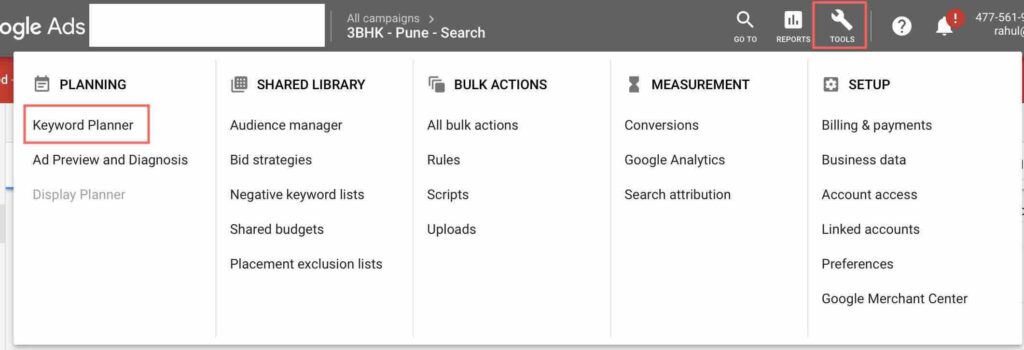
Google Keyword Planner is a tool by Google, it’s part of the Google Ads/Adwords account. Google keyword planner helps you to understand different combination of searches happening on Google, helps you to select the right set of keywords for your campaigns, helps you to see search volume, historical metrics data and forecasts for your keywords. Search campaigns will only perform well if you have selected the right set of keywords for your campaigns. So let’s understand, How to use Google Ads Keyword Planner! Sign In to your Google Ads account Go to Keyword Planner Tool by clicking on the tools icon on the right hand side of your Google Ads/Adwords account. Once you click on the tools icon, you will see keyword planner on the left hand side of the drop down. 4) Once you click on keyword planner, you will reach the keyword planner tool which would look like this Here you will see two options Find New Keywords and Get Search Volume & Forecasts Find New Keywords With this option, you can find keywords that can help you reach users interested in your product or service Get Search Volume & Forecasts With this option, you can view search volume data, historical metrics of your keywords and view forecasts for how they would perform in future Let’s understand each of the option in detail! Find Keywords This option is useful, if you are looking to understand different keyword options which you would like to target on Google search basis your product or service. Let’s take an example and use this option to understand in detail. Let’s say, you are looking to target users who are looking for 3 BHK flats in Balewadi (which is in Pune), on Google Search. So click on Find New Keywords option and enter only one single term which you think is the right keyword for your business. Follow below screenshot Once you have entered the keyword below, the tool will suggest you multiple set of keywords which people are searching on Google. You now need to select the city which you are targeting for your campaign (this will help you to get the data of the searches happening from that city). Each keyword will have Avg. Monthly Searches Competition Top of page bid (low range) Top of page bid (high range) (Reference Screenshot of the results) Avg. Monthly Searches Avg. Monthly Searches are the average searches happening for a keyword in a month for a particular keyword. It doesn’t matter much in Google Ads because the priority while selecting the keyword is the relevancy first, if the searches are low, that’s fine! Avg. Monthly Searches matter in SEO Competition Competition column shows high, medium and low as options. This column means how competitive is for a keyword to rank in a specific location and search network targeting which you have selected. It is defined by the no of advertisers bidding on each of these keywords on Google Search. If you see a dash (-), that means Google don’t have enough data to show. If the competition is high but the keyword is relevant to your product or service, then you will select the keyword, the bid might go high, but that’s okay as you are targeting the right searches on Google. Same is applicable for Medium and Low competition keywords, if the keyword is relevant, you will go ahead and select the keyword. Eg: In the below keywords 3 bhk flats in balewadi has high competition but the keyword is relevant, so we will consider this keyword for our campaign 3 bhk in balewadi has medium competition but the keyword is relevant, so we will consider this keyword for our campaign Top of Page Bid (Low Range) Top of Page Bid (Low Range) Column shows the lowest bid advertisers have historically paid for a particular keyword basis your location & search network settings. This is basis historic data of Google showing the lowest bid paid for a keyword which gives you an idea about the lowest bid you can bid for a particular keyword. It is important to note that each keyword will have a separate bid. Top of Page Bid (High Range) Top of Page Bid (High Range) Column shows the highest bid advertisers have historically paid for a particular keyword basis your location & search network settings. This is basis historic data of Google showing the highest bid paid for a keyword which gives you an idea about the highest bid you can bid for a particular keyword. Every keyword in the campaign will have a separate bid. (Note: Higher bids does not guarantee top position) Take away from Find Keywords option: We will select the relevant keyword, irrespective of the searches, irrespective of the competition and irrespective of the top of page bid (low & high) Get Search Volume & Forecasts: Get Search Volume & Forecasts is an option to be used when you have a list of keywords and you want to understand how many clicks you will receive, what will be the CPC of each keyword, what will be the CTR of your campaign and more. You need to paste the keywords/lists in the Search Volume & Forecasts option. Let’s take an example of 3 BHK flats in Balewadi and try to understand this. Paste the keywords which you have in the box as below (you can also upload file directly from the option upload a file) Once you click Get Started option on the bottom right, you will see data as below Here Google gives you a forecast with respect to each keyword including clicks, impressions, CTR, total cost and the cpc. It’s important to note that this in a forecasts, the actual no’s can vary. Also, once you click on Historic Metrics, you can also see month on month trends for the keywords you have entered. This is a good way to look at when a product is seasonal eg: Travel Business So now we have
Google Search Ads Keyword Match Types
One of the key aspects on which the performance of your campaigns depend in Search Ads is keywords. Selecting the right keywords is important in order to not only show ads to relevant users looking for your products and services but also it helps to optimize your bids and budgets of the campaigns, resulting in higher ROI. Keywords are the words/phrases which you use in your campaigns as a targeting method to show ads on Google Search. When user searches for the keyword, which is in your campaign, then the ad is triggered. But in Google Ads there are different types of keywords which are called as keyword match types, basis which your ads are eligible to show on Google Search. So what do your understand by Keyword Match Types? Keyword Match Types are different types of keywords basis which you can target multiple set of keywords. Selecting the right set of keyword is important in order to reach out to the right searches happening on Google, wrong selection of match type can lead to irrelevant clicks. There are 5 Types of keyword match types in search ads which are as below Broad Match Type Phrase Match Type Exact Match Type Broad Match Modifier Type Negative Match Type Let’s understand each one of them and how do they work! Advanced Google Adwords Course by Rahul Gadekar – Access Now Broad Match Type Broad Match Type is the default match type of Google, when you create a campaign, this match type is by default defined for your keywords. Broad Match Type will give you wider reach but the relevance will be lesser to the searches. When you select broad match type of keyword, your ad is eligible to trigger if any single word matches the users search query. Let’s understand with few example Keyword in Search Ads User Search Query Why Ad is Eligible To Show Bali Holiday Packages Salman Khan Bali Bali single word matched Resorts in Coorg Coorg Weather Coorg single word matched Digital Marketing Course Digital Film Camera Digital single word matched From the above examples you can see that your ad is getting triggered if a single word is matched with your keyword, which concludes that most of the times your ads will be triggered for irrelevant keywords. Irrelevant keywords will leads to irrelevant clicks, so this type of match type is not recommended for your campaigns. Phrase Match Type: Phrase Match Type is another keyword match type wherein your ads are eligible to show when uses searches with additional words before or after your keyword. Your ads won’t show if any word is added in the middle of the phrase. Phrase Match Type keywords are used in the campaign with quotation marks like “your keyword”. Let’s understand how phrase match works with few examples: Phrase Keyword in Search Ads Campaign User Search Query Why Ad is Eligible To Show “Bali Holiday Packages” Best bali holiday packages Bali Holiday Packages search phrase matched “Resorts in Coorg” Luxury resorts in coorg Resorts in Coorg search phrase matched “Digital Marketing Course” Digital Marketing Course with Placements Digital Marketing Course search phrase matched This is an effective match type as you are defining the phrase for your campaign and you are including all the possible combinations for your keyword, this increases your chances to participate in multiple set of keywords, resulting in higher reach and visibility on search. Exact Match Type: In this match types, your ads will show if your keyword exactly matches user’s search query or are close variations of that exact term. Google has recently update it’s exact match type, which says that if the meaning of the word remains the same but the query has a different order, in that case your ad will also show on Google search. Exact Match Type keywords are used in the campaign with square bracket marks like [your keyword]. Let’s understand how Exact Match Type works with few examples: Exact Keyword in Search Ads Campaign User Search Query Why Ad is Eligible To Show [Bali Holiday Packages] Bali holiday packages Bali Holiday Packages matches exactly [Resorts in Coorg] Coorg resorts Resorts in Coorg meaning is same [Digital Marketing Course] Digital Marketing Course Digital Marketing Course matches exactly Exact match type of keywords are very effective, if you are looking for higher ROI campaigns. They will help you to reach out to the right audience looking for your products and services. One of the issue with Exact Match type is that it reduces the visibility as you are targeting limited set of keywords for your campaigns, in that case you can use multiple match types in a single campaign. Broad Match Modifier Match Type (BMM) Broad Match Modifier match type keyword is designated with + symbol. It is an advanced version of broad match wherein the search query should match all the words used in the keyword, the words used can be in any order. Lets understand with examples: BMM Keyword in Search Ads Campaign User Search Query Why Ad is Eligible To Show +bali +holiday +packages Luxury Holiday packages to bali Bali Holiday Packages included in the search query +resorts +coorg Private family resorts in coorg Resorts & Coorg included in the search query +red +tshirts Buy red tshirts for men Red & Tshirts included in the search query You can see that the visibility of your ad increases to multiple combination of keywords. It is important to note that the ad will only show if the words used in the keyword are part of the search query, so selecting the right words for BMM is very important as it also increases chances of participating in irrelevant keywords, for which you have to monitor the search term report for few days to check the clicks received on the actual queries. Negative Match Type The last keyword match type is Negative Match Type, this type of match type is used to exclude irrelevant keywords from your campaigns. You would want
Top 8 Digital Marketing Trends To Watch Out for In 2019
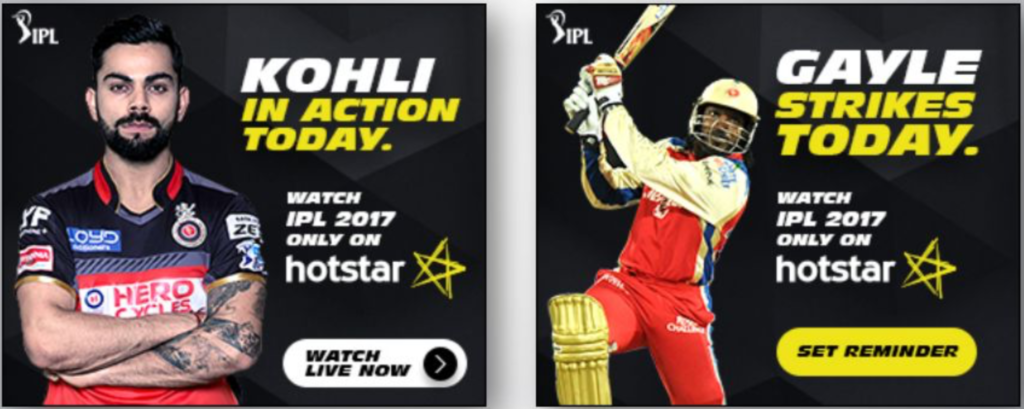
Marketing is about storytelling and Digital Marketing is about telling a story with Innovations to your target audience with the help of technology. With the help of technology you can craft your messages beautifully and reach your audience making a high impact about your business. Technology can refine your targeting methodology, communication methodology and engagement methodology. Here are top 15 Digital Marketing trends to watch out for in 2019 which you can adopt to boost your ROI 1) Dynamic Creative Optimization (DCO) Dynamic Creative Optimization is the process of serving ads through customized technology that automates your display strategy, personalise your brand communication to each user, recommends feeds through user interest, tracks the behaviour and then recommends products basis user engagement, plugins real-time data feed in your communication etc Dynamic Creative Optimization (DCO) is an effective methodology compared to your static display marketing approach. DCO engine can actually help you to improve your performance across business verticals at scale with higher efficacy. DCO is considered to be the future of Display Marketing because of it’s customization capabilities at every level of the communication journey. Many brands have started adopting DCO to scaleup their display marketing efforts and are experimenting it with different DCO variables to maximize their ROI DCO can be used with different variable for your campaigns which are as follows: Sequential Messaging Real Time Data & Live Streaming Integration Retargeting Personalized Information Timer DCO Weather API DCO Example of Real Time Data DCO This is from one of our campaigns for IPL (HotStar), executed with Hockey Curves technology. In this DCO variable live match event updates are triggered on the assets when the match is live. Events include sixes, player stats, score, wicket, hatrick etc are triggered in real time on ad sets targeting IPL interest users on web. This helps to bring in real time user acquisition and real time engagement for the campaign. (Note: Selecting of variable will differ from business to business) For more details about DCO Case Studies follow this link DCO Cases 2) Programmatic Advertising The ultimate goal of every business is to acquire users at low-cost. So in order to acquire users at low-cost, it is important to also buy media at an effective price and reach out to the relevant audience in lower cost. Using Google Display, we don’t have a control of the actual cost of a particular click or per thousand impressions, though we define it in manual cpc way. Programmatic Advertising not only gives you an opportunity to buy media at a lower cost but also helps you to target your audience basis their behaviour on web, which makes the ad sets more relevant and engaging, helping to achieve higher ROI. Lot of advertisers are moving from traditional display campaigns to Programmatic Advertising display campaigns due to its ability to be more precise in targeting and having an open pool of inventory for rich media ads with lower cost. The global Programmatic Market is expected to reach 2,44,100 million USD by 2023 (ref Market Watch) including Search, Display and Video. The interesting part here is that you can also advertise on Social Media channels through Programmatic which is going to rise in coming years. Crafting & Optimizing effective Programmatic Advertising campaigns is still a challenge as advertisers are still executing ad campaigns with different levels of experimentation. Also, the skills required in this domain is still at a nascent stage, which also gives rise to the rising demand for Digital Marketing professionals in Programmatic Advertising domain. One of our programmatic campaigns we did for Fast & Furious 8 involved a strategy of studying the user behaviour of the users on the movie sections of the websites. Using data science and heat maps we identified the users who had interacted with our ad sets and personalized the next level of the communication for every user. Fast Furious 8 Campaign Results 90Mn+ Ad Impressions 25Mn+ Unique Users Reach 18Mn+ Trailer Views 100 Cr+ Box Office Collections Below are few ad sets of our campaign To Download the Case Study – Request Here 3) Rich Media Ads Rich Media Ads are ads which encourage users to interact and engage with the ads. Users can interact with the ads, the ads can expand, users can scroll the ads, watch in banner videos, you can create a website in a banner etc. Static display ads don’t attract the users, rich media ads helps us to get the attention of the users and then engage them with the brand content. The ads can be display ads, video ads or HTML ads. Rich Media Ads have higher interaction rates, higher view rates and have high brand recall. Thus making it the right choice for high impact digital marketing campaigns. Below are few examples of Rich Media Ads (Click here to watch Rich Media creative live) (Click here to watch Rich Media creative live) (Click here to watch Rich Media creative live) 4) Sequential Video Ads Sequential Ads are storytelling ads, these ads allow you to tell a story in a particular sequence to a single user. (Sequential Display ads can be done through DCO as discussed above, click here to know more). Sequential Video Ads are now available on YouTube! Below is a screenshot which shows the option, you need to select while defining video ad sequencing through YouTube With YouTube video ad sequencing, you can communicate with your audience with a brand story in a sequence you define to a particular user. You can use video sequence to also communicate a particular theme of a brand, seasonal campaign of a brand, series of communication of your brand campaign etc. Sequencing in Google Ads YouTube campaign, the sequence step has to be selected at the campaign level. Below is the option where you need to select the sequence step. Below is an example of YouTube Video Ad Sequencing campaign we did for Evolve Back Resorts. Our sequencing campaign had 3 Videos
Ultimate Guide To Dynamic Creative Optimization (DCO) In 2025

Dynamic Creative Optimization also know as Dynamic Creative relates to Display Ads, in today’s scenario most Digital Marketers are facing challenges to improve the performance of their display ad campaigns as most of them go with a static display marketing approach. Marketers try different creatives, ad copies, headlines, templates to improve the performance of their display campaigns, but still they are struggling with the performance of their campaigns. As we all know that display is a push marketing concept wherein we are trying to first grab the attention of the user, then communicate the product, then engage with the audience and then convert them into a sale/lead. So how does one improve the performance of their campaign, communicate the product/service to the targeted audience effectively and engage them at every level of communication in the product journey? Let’s understand in detail! So What is Dynamic Creative Optimization (DCO) in Digital Marketing? Dynamic Creative Optimization or Dynamic Creative refers to serving display ads through programmatic advertising with the help of real-time technology that ads scale, personalisation, automation and a storytelling approach. The dynamic creatives change automatically based on information about the user related to his behaviour, engagement, interest, location or context. The Process of Dynamic Creative Optimization (DCO) Implementing DCO is a multi-layered process, each step integral to ensuring the ads are as effective and relevant as possible. a) Creating a Variety of Creative Assets Understanding Diverse Creative Elements: This step involves the creation of multiple variants of each part of an ad. This includes images, headlines, body text, calls-to-action (CTAs), and other interactive elements. The goal is to have a rich library of creative components that can be dynamically combined based on the target audience. Designing for Flexibility: Each asset is designed with flexibility in mind. It’s crucial that these elements can be seamlessly integrated into different ad formats and platforms without losing their impact or coherence. Ensuring Brand Consistency: While variety is key, maintaining a consistent brand voice and visual identity across all assets is essential. This helps in keeping the brand recognizable and trustworthy, irrespective of the ad variations. b) Integrating DCO with Marketing Tools and Platforms Choosing the Right Technology: Selecting a DCO platform that integrates well with existing marketing tools is crucial. This platform should be capable of handling real-time data processing and be compatible with the ad networks and channels you use. Seamless Integration: Integration involves setting up connections between the DCO system, your digital asset management (DAM) system, and other marketing tools like CRM (Customer Relationship Management) and CDP (Customer Data Platform). This ensures that the DCO system has access to all necessary data points. Testing and Optimization: Before full deployment, it’s important to test the DCO system for functionality, data accuracy, and creative rendering across different devices and platforms. This phase may involve A/B testing to determine the most effective ad variants. c) Collecting and Analyzing Data to Inform Creative Variations Data Collection: This step involves gathering data from various sources like website interactions, customer purchase history, social media engagement, and third-party data providers. The more comprehensive the data, the more precise the targeting can be. Data Analysis and Insights: Using machine learning algorithms, the DCO platform analyzes this data to identify patterns and insights. For instance, it might find that users in a certain age group respond better to a specific type of CTA or that a particular headline resonates more with users from a specific geographic location. Dynamic Ad Assembly and Personalization: Based on these insights, the DCO system dynamically assembles ads in real-time, choosing the most relevant creative elements for each individual user or user segment. This ensures that each user is presented with an ad that is likely to be the most engaging and effective for them. Dynamic Creative Variables Below are few Dynamic Creative Optimization / Dynamic Creative variables which can be used dynamically for your display campaigns in real time, helping you to achieve higher ROI: Real Time or Live Streaming Data Sequential Messaging Weather API Timer DCO Remarketing Info Feed Based Customization So let’s understand each variable with few cases we executed for path breaking campaigns with HockeyCurve’s cutting edge technology of DCO Understanding Variables with DCO Case Studies / Dynamic Creative Case Studies 1. Real Time or Live Streaming Data Real Time or Live Streaming Data variable, is a variable about what’s happening live in a match, on a TV show, on an awards function, technology event or any event which is live. Data or content pieces of that event can be automatically pulled on the display banners in realtime and served through programmatic advertising. We executed DCO with Real Time variable for one of the biggest cricket event of the country, Indian Premier League (IPL 2017 & IPL 2018) for HotStar. This was the first time where in Live Streaming Data was used for one of the biggest event in the history on Digital Media. So let’s understand how did we approach, what we did and how we did! The Challenge: To acquire users on Hotstar during the live IPL matches! What we did? Basis our research team data, we got to know that lot of users during live match, they visit different websites like Sports Keeda, Cricinfo, Cricbuzz and other sport websites, to check live score as they want to be updated at every level of the match. So, we then understood, what are the key events of interest which users look in a match. Key events include Who won the toss, Sixes, wickets, century, half century, bowler stats and match events. We then defined these key events as the cornerstone of the strategy for DCO by pulling realtime data while the match is live, for all the key aspects and then triggering these key aspects through DCO ads in realtime. Below are few real time DCO events of the campaign: Toss: Getting users on the platform to watch the match as the toss has just happened, the ad set is triggered within
Google Ad Extensions Guide To Increase ROI

Ad Extensions are part of Ad Copy, they expand your ad with additional information, making your ad more prominent which encourages users to click on your ad. The additional information can be location of your business, link to an internal page on the website, pricing information, deals page link, app download link etc. Below is a screenshot which has different ad extensions. Ad Extensions are divided into two categories: Manual Ad Extensions – Manual Ad Extensions includes filling of your business information manually Automatic Ad Extensions – Automatic Ad Extensions does not require to fill your business information, they are triggered automatically. Always go with Manual Ad Extensions, as you have better control over what information to show and what extensions to show basis your business. Advanced Google Adwords Course by Rahul Gadekar – Access Now Different Types of Manual Ad Extensions in Google Search Ads Sitelink Extensions Callout Extensions Structured Snippet Extensions Call Extensions Message Extensions Location Extensions Affiliate Location Extensions Price Extensions App Extensions Promotion Extensions Lead Form Extension So let’s understand in detail each Ad Extension: Sitelink Extensions Sitelink Extensions are additional links to your Ad Copy. Sitelinks can help you to take users to specific pages on your site which includes a product page, a service page, free trial page, contact us page, offers page etc. When your ad is shown, at least 2 sitelinks will be shown minimum at a time. Maximum sitelinks you can ad is 6 sitelinks. Below is an example of a sitelink, when it is shown with your ad copy Guidelines for writing effective Sitelink Extensions Add USP’s in your description Add Sales Pitch in your description Add keywords in your description Add Call To Action like Free Trial, Sign Up Now, Best Deals etc For mobile, sitelinks will appear side by side, in a single line (follow the above screenshot) Focus high on mobile sitelinks as most of the searches happen on mobile Add Sitelinks at the campaign level only CallOut Extensions CallOut Ad Extensions are non clickable, they allows you to add additional information about your business, products/services, features etc. They usually appear on the 4 line of the Ad Copy. Below is an example of CallOut Extension. Guidelines for writing effective CallOut Extensions Add Unique Selling Proposition Add Features of the products/services You can add text including Free Shipping, 24 Hours Support, 1 Warranty etc to attract shoppers Always add CallOut extensions as they are non clickable Add CallOut extensions at campaign level only Structured Snippets Extensions Structured Snippets appear below Callout extensions. It can be used to highlight key aspects of your brand/product/services including: Amenities Brands Courses Degree Programs Destinations Featured Hotels Insurance Coverage Models Neighborhoods Service Catalog Shows Styles Below is an example of Structured Snippets Guidelines for writing effective Structured Snippets Extensions Add the right header basis your business/product/service Highlight the key features of the product/service Keep it concise and precise Don’t repeat the features from the one’s mentioned in the ad copy Always add Structured Snippets at campaign level only Call Extensions Call Extensions are extensions which allow you to add phone numbers to your ad copy. It’s an effective ad extension on mobile, as users can click on the ad and connect with the business directly over a call, which can eventually increase sales. Below is an example of call extensions with an ad copy Guidelines for defining effective Call Extensions Make sure that you set a differential bidding for mobile device so that your ads rank higher in mobile search Make sure you have a team assigned to take the call or else the experience of the customer would be bad Make sure that you define Ad Scheduling, so that the phone no is triggered only during office hours Make sure that you setup call conversion tracking in Google Ads with your Google Forwarding Number You can also create a separate Click to call campaign which will allow you to define a click to call CTA for mobile devices and then you can schedule the campaign with respect to your office hours Click to call campaigns are effectively for business like restaurants, spas, saloons etc You can use call extensions on desktop as well, in this case if an user calls by looking at the search ad on desktop, you won’t be charged for click Message Extensions Message Extensions allows you to send message to your potential customers directly from your ad. This type of ad extension is only available on mobile devices. Users who are on mobile devices can directly send messages to advertisers once they click the ad. Below is an example of message extension Guidelines of Defining Message Extensions Message Extensions are useful to book an appointment, get quote, request a call back, coupon code offers etc Message Extension should not be used for Ecommerce Businesses, E-Ticketing Business or any website which has a payment gateway Message Extensions can be used for Restaurant Business, Spa & Salon Business, Booking Doctor Appointments etc You can’t track conversions through message extensions, the best way is to setup a Google forwarding no to track conversions If you are in USA, Brazil, or Australia, you can also setup an auto reply message, which will be automatically sent to the customers who contacted you through message extension. Location Extensions Location Extension allows you to set up your business location on Google Search Ads, so that users can locate your business once clicking, on Google Maps. You need to connect your Google My Business account in order to get location extension activated for your ad copy. Below is an example of location extension on Google Search Ad Guidelines for Defining Location Extensions Use Message Extensions for keywords on mobile which includes nearby For Eg: Restaurants Nearby, Saloons Near By, Coffee Shops Nearby etc Make sure you add all the information on your business page including working hours, phone nos, photos, reviews, directions etc Location Extensions can also appear on Google Maps search results Location
क्या है डिजिटल मार्केटींग? (Digital Marketing In Hindi)
पिछले कई सालों से मार्केटींग के क्षेत्र में डिजिटल मार्केटींग एक महत्त्वपूर्ण विषय हो रहा है और आनेवाले सालों में यह मार्केटींग के लिए एक प्राथमिक माध्यम बनजायेगा । हर एक व्यावसायिक डिजिटल मार्केटींग अपनाना चाहता है, डिजिटल मार्केटींग में काम करनेवालों को नौकरी पे रखना चाहता है, जिससे वह निवेष की वापसी में वृद्धी कर सके । इस के साथ ही सैल्स, आईटी एवं बाकी कई पेशेवर डिजिटल मार्केटींग मे अपना करीअर बना रहे है । गूगल सर्च ट्रैन्डस् डिजिटल मार्केटींग के लिए दिन ब दिन कैसे बढ रहा है, देखिये । तो बखुबी से जानिए क्या है डिजिटल मार्केटींग! डिजिटल मार्केटींग की परिभाषा डिजिटल मार्केटींग यह उत्पादन या सेवाओं का इलैक्ट्रोनिक या इंटरनेट से मार्केटींग करने का एक माध्यम है। डिजिटल मार्केटींग के बारे में ज्यादा जानकारी लेने से पहले चलिए जानते है पारंपारिक मार्केटींग की तुलना में डिजिटल मार्केटींग के क्या फायदे है! (पारंपारिक मार्केटींग में समाचारपत्र में विज्ञापन, मासिक पत्रिका में विज्ञापन, होर्डींग आदी का समावेश होता है।) पारंपारिक मार्केटींग के मुकाबले डिजिटल मार्केटींग के फायदे (Advantages of Digital Marketing in Hindi) सटीक लक्ष्य (Precise Targeting): डिजिटल मार्केटींग विज्ञापदाताओं को उम्र, लिंग, रुचि, विषय, की-वर्डस्, वेबसाईट, शहर, पिन कोड इत्यादी सहित अपने दर्शकों को ऍड लक्षित (ऍड टार्गेट) करने की अनुमती देता है। पारंपारिक मिडिया की तुलना में यह बहुत सटीक है। रियल टाईम आप्टीमायझेशन (Real Time Optimisation): डिजिटल मार्केटींग के जरीए हम अपना विज्ञापन कैम्पेन में, जरुरी बदलाव रिअल टाईम में कर सकते है जिसका मतलब है अक्षर रणनीति काम नही कर रही है तो हम तुरंत दुसरी रणनीति को अपना सकते है, जहाँ की पारंपारिक मार्केटींग की पद्धती में एक बार विज्ञापन प्रकाशित हो गया तो हम बदलाव नही कर सकते। विश्लेषण (Measurable): डिजिटल मार्केटींग के माध्यम से हम आसानी से जान सकते है की कितने उपयोगकर्ता के पास अपना विज्ञापन पहुचा है, हमारे विज्ञापन पर क्लिक करने के बाद कितने लोगो ने प्रोडक्ट खरीदा है, उन्होने कितना समय वेबसाईट पर व्यतीत किया है, वो वेबसाईट की कितने पेजेस देख रहे है, उनको प्रोडक्ट खरिदने में या लीड फॉर्म भरने में कितना समय लग लागा है और बहूत कुछ, जहाँ की पारंपारिक माध्यम में हम ये सब विश्लेषण नही कर सकते । लगाव बनाना (Build Engagement): डिजिटल मार्केटींग ब्रैन्ड को अपने ग्राहकों के साथ लगाव बनाने में मदत करता है, अपने ग्राहकों के साथ रियल टाईम में समाज माध्यम (सोशल मिडीया) के जरीये बाचतीत कर सकते है और अपने ब्रैन्ड के साथ जुड कर रहने के लिए मदत करता है और अपने व्यवसाय के अनेक पहलू में ब्रैन्डस का संचार बनाए रखता है । निजी संचार (Personalised Communication): डिजिटल मार्केटींग का सबसे बढिया फायदा यह है की, आप हर एक युजर से डिज़िटल के जरिए निजी संचार बना सकते है। विज्ञापनकर्ता उनके ग्राहको के साथ प्रभावी रुप से संचार कर सकते है, उनकी जरुरतों को समज सकते है और उसके संबंधी मतलब का संदेश भेज सकते है, जिससे ब्रॅंड्स को अपना लक्ष्य प्राप्त करना आसान हो जाता है। किफायती (Cost Effective): डिजिटल मार्केटींग किफायती है, आपको जितने क्लिक्स मिले है या आपका विज्ञापन जितनी बार ट्रिगर हो चुका है उतने ही पैसे देने पडते है। आप का बज़ट कितना भी हो, आप डिजिटल माध्यम मे विज्ञापन शुरु कर सकते है। विज्ञापनकर्ता अपना मार्केटींग कैम्पेन काम से काम बजेट में आजमा के अपनी मा़र्केटींग स्ट्रैटीजी बना सकते है। पारंपारिक माध्यम के मुकाबले कम बज़ट में आप ज्यादा से ज्यादा लोगों तक पहुँच सकते है जिससे आपका लगभग मार्केटींग खर्चा बच जाता है। निवेश की उच्च वापसी (Higher ROI): डिजिटल मिडीया मे पारंपारिक माध्यम के मुकाबले निवेश की वापसी अधिक है । जहाँ लक्ष्य ज्यादा सटीक है, इससे जिनको रुची नही है, उनके सामने आपका विज्ञापन दिखना कम होता है, इसी वजह से आप अपने व्यवसाय का उद्देश प्राप्त कर सकते है। डिज़िटल के जरिये, जिसने आपका विज्ञापन क्लिक किया है, ऐसे युज़र को आप ट्रैक कर सकते है और दुबारा विज्ञापन दिखा के आप उसे अपना ग्राहक बना सकते है। डिजिटल मार्केटींग का ऑनलाईन और ऑफलाईन चैनल में वर्गीकरण करते है। डिजिटल मार्केटींग – ऑनलाईन मार्केटींग चैनल्स (Digital Marketing in Hindi – Online Marketing Channels) सर्च एन्जिन ओप्टीमायज़ेशन (SEO) सर्च एन्जिन मार्केटींग (SEM) सोशल मिडिया मार्केटींग (SMM) पे पर क्लिक मार्केटींग (PPC) डिसप्ले मार्केटींग (Display Marketing) कन्टेन्ट मार्केटींग (Content Marketing) अफिलेट मार्केटींग (Affiliate Marketing) ई मेल मार्केटींग (Email Marketing) विडिओ मार्केटींग (Video Marketing) मोबाईल मार्केटींग (Mobile Marketing) जानते है इन सब के बारे में 1. सर्च एन्जिन ओप्टीमायज़ेशन (SEO) सर्च एन्जिन ओप्टीमायज़ेशन यह आपके वेब साईट के रैकिंग की एक प्रक्रिया है जो सर्च एन्जिन का ओरगैनिक / नॉन पेड सर्च का नतिजा होता है। ओरगैनिक सर्च रिजल्ट में वेब पेज का रैकिंग नीचे दिए फैक्टर्स पर निर्भर होता है कन्टेन्ट स्ट्रैटीजी ऑन पेज ओप्टीमायजेशन ऑफपेज ओप्टीमायजेशन 2. सर्च एन्जिन मार्केटींग (SEM) सर्च एन्जिन मार्केटींग एक ऐसी प्रक्रिय है जो आपके वेब साईट की विजिबिलीटी ओरगैनिक और पेड सर्च रिजल्ट के जरिए बढाती है। आसान श्ब्दों में कहा जाए तो एसइएम (SEM) = एसइओ (SEO) + पेड सर्च नीचे दिए स्क्रीन शॉट्स गूगल सर्च पर पेड सर्च रिजल्ट और ओर्गैनिक का फर्क बताते है । 3. सोशल मिडिया मार्केटींग (Social Media Marketing) सोशल मिडिया मार्केटींग में आपके उत्पादन एवं सेवाओं को बढावा देने के लिए सोशल मिडिया चैनल्स का प्रयोग किया जाता है। सोशल मिडिया मार्केटींग मे नीचे दिये गये चैनल्स मौजूद होते है फेसबुक ट्विटर युट्युब लिन्क्डैन पिन्टेरेस्ट स्नैपचाट गूगल प्लस सोशल मिडिया एक प्रभावशाली माध्यम है, जिससे आप आपके ग्राहकों तक पहुँच सकते है, उनके साथ लगाव बना सकते है और बातचीत कर सकते है। मानो ब्रैन्ड और ग्राहक आमनेसामने हो कर संवाद कर रहे हो। 4. पे पर क्लिक (Pay Per Click) पे पर क्लिक हमेशा पीपीसी से जाना जाता है। पे पर क्लिक मार्केटींग एक ऐसा ऑनलाईन मॉडेल है जहाँ विज्ञापनकर्ता, पब्लिशर को प्रति क्लिक के हिसाब से पैसे देता है। इसमें आपका विज्ञापन कितनी बार ट्रिगर हो चुका यह बात मायने नही रखती। जितनी बार विज्ञापन क्लिक हुआ हो विज्ञापनकर्ता पब्लिशर को उतने ही पैसे देता है। उदाहरण: नीचे दी गई स्क्रीन शॉट में 4 विज्ञापन पीपीसी है। अगर युजर इन में से कोई भी विज्ञापन पर क्लिक करता है, संबंधि विज्ञापनकर्ता को पे पर क्लिक के हिसाब से
डिजिटल मार्केटिंग म्हणजे काय (Digital Marketing in Marathi)

गेल्या काही वर्षांपासून डिजिटल मार्केटिंग हे मार्केटींगमध्ये ट्रेन्डिंग( नेहमी चर्चिल्या जाणाऱ्या ) विषयांपैकी एक आहे आणि येत्या काही वर्षांत मार्केटिंगसाठी हे प्रमुख माध्यम असणार आहे. म्हणूनच प्रत्येक व्यावसायिकाने डिजिटल मार्केटिंग स्वीकारणे, डिजिटल मार्केटिंग मधील कुशल लोकांना नौकरीस ठेवणे आणि डिजिटल मार्केटिंगद्वारे आर ओ आय वाढविणे आवश्यक आहे. सेल्स, आयटी आणि इतर विभाग आणि उद्योग धंद्यांमध्ये काम करणारे अनेक नौकरदार करिअर म्हणून डिजिटल मार्केटिंगकडे वळत आहेत! तुम्ही खालील गुगल ट्रेंड्स ग्राफ द्वारे पाहू शकता कि डिजिटल मार्केटिंग बद्दल माहिती घेणाऱ्यांची संख्या दिवसेंदिवस वाढतच आहे. एकूण प्रक्षेपित यूएस डिजिटल जाहिरात खर्च (2021 पर्यंत डिजिटल जाहिरात 130 अब्ज डॉलर्सपर्यंत पोहोचेल – स्रोतः ऍपनेक्सस) चला तर मग, समजावून घेऊ कि डिजिटल मार्केटिंग म्हणजे काय? डिजिटल मार्केटिंग ची व्याख्या डिजिटल मार्केटिंग म्हणजे इलेक्ट्रॉनिक मीडिया आणि इंटरनेट यांच्या माध्यमातून केल्या जाणाऱ्या मार्केटिंग चा १ प्रकार आहे . डिजिटल मार्केटिंग विषयी खोल जाण्यापूर्वी, आपण पारंपारिक मार्केटिंगवर डिजिटल मार्केटिंगचे फायदे समजून घेऊ या. (पारंपरिक मार्केटिंग मध्ये वर्तमानपत्र जाहिराती, मासिक जाहिराती, होर्डिंग जाहिराती इ. यांचा समावेश आहे) फ्री डिजिटल मार्केटिंग कोर्स by Rahul Gadekar साठी, येथे क्लिक करा पारंपारिक मार्केटिंगवर डिजिटल मार्केटिंगचे फायदे! (Advantages of Digital Marketing in Marathi) लक्षीकृत जाहिरात मोहीम (Precise Targeting): डिजिटल मार्केटिंग जाहिरातदारांना, वय, लिंग, स्वारस्य, विषय, कीवर्ड, वेबसाइट्स, शहर, पिन कोड वगैरे इत्यादीसह जाहिरात टार्गेट करण्याची परवानगी देते. पारंपारिक माध्यमाच्या तुलनेत हे अत्यंत सरळ सोपे आहे जिथे श्रोत्यांना विविध पद्धतीनुसार ऍड टार्गेट करणे कठीण आहे. रिअल टाइम ऑप्टिमायझेशन (Real Time Optimisation): डिजिटल मार्केटिंगद्वारे आपण आपल्या जाहिरात मोहिमांना रिअल टाइममध्ये बदलू शकतो म्हणजे जर रणनीती कार्य करत नसेल तर आपण लगेच दुसर्या धोरणाकडे वळू शकतो, तर पारंपरिक मार्केटिंगमध्ये, एकदा आपण जाहिरात दिल्यानंतर आपण तिच्यात मध्ये बदल करू शकत नाही . परिणाम मोजणे शक्य (Measurable): डिजिटल मार्केटिंगचा परिणाम मोजणे शक्य आहे, आपल्याला सहजपणे कळू शकते की आपली जाहिरात किती लोकांपर्यंत पोहचली आहे, किती लोकांनी आपल्या जाहिरातींवर क्लिक केले आहे, किती लोकांनी जाहिरातीतून आपली सेवा किंवा वस्तु विकत घेतली आहे, लोक आपल्या वेबसाइटवर किती वेळ घालवत आहेत, ते किती व कोणकोणती वेबसाइट ची पाने पाहत आहेत , ग्राहक आपल्याकडे वेबसाइट वर आल्यापासुन त्याने त्या सेवेच्या किंवा वस्तुच्या खरेदीसाठी किती वेळ घेतला हे पाहु शकतो, जे पारंपारिक माध्यमामध्ये मोजणे अशक्य आहे. ग्राहकांशी संवाद वाढवा (Build Enagement): डिजिटल मार्केटिंग ब्रँड्सना त्यांच्या ग्राहकांबरोबर सोशल मीडिया च्या माध्यमातुन संवाद वाढविण्यास मदत करते. ब्रॅण्ड सद्य परिस्थितीत ग्राहकांशी कनेक्ट राहू शकतात आणि त्यांच्या खरेदीच्या एकूण प्रवासादरम्यान त्यांना ब्रँड च्या संवादात व्यस्त ठेवून खरेदीस मदत करू शकतात. वैयक्तिक संवाद (Personalised Communication): डिजिटल मार्केटिंग चा सर्वात मोठा फायदा हा कि तुम्ही प्रत्येक ग्राहकाशी वेगळ्या पद्धतीने संवाद साधू शकता. याप्रकारे प्रत्येक ग्राहकाची गरज लक्षात घेऊन त्याला पाहिजे त्या मार्केटिंग संवादाने तुम्ही सेवा किंवा वस्तु घेण्यास प्रवृत्त करू शकता. यामध्ये त्यांची गरज लक्षात घेऊन, त्यांना लागु होईल असा संवाद करून तुमच्या ब्रँडचे उद्दिष्ट मिळवु शकता. कमी खर्चिक (Cost Effective): डिजिटल मार्केटिंग अत्यंत स्वस्त आहे. जितके ग्राहक तुमच्या जाहिरातींवर क्लीक करतील, तितकेच पैसे तुम्हाला द्यावे लागतात. तसेच कोणत्याही बजेट नुसार तुम्ही सुरवात करू शकता. ज्याने जाहिरातदारांना किंवा कंपन्यांना थोड्या थोड्या बजेट ने जाहिराती देऊन त्यांचा काय परिणाम होतो याची सुविधा मिळते. तुम्ही कमीत कमी बजेट मध्ये जास्तीत जास्त ग्राहकांपर्येंत पोहचून तुमच्या एकूण मार्केटिंग खर्चात कपात करून आणू शकता. गुंतवणुकीपेक्षा जास्त फायदा (Higher ROI): पारंपरिक मार्केटिंग च्या तुलनेत डिजिटल मार्केटिंग कमी गुंतवणुकीमध्ये जास्त फायदा मिळवू देते कारण आपल्या उद्योगास आवश्यक असणाऱ्या ठराविक लोकांनाच आपण जाहिरात दाखवतो ज्यामुळे त्यासाठी खर्च हि कमी लागतो. सोबतच डिजिटल मार्केटिंग मधुन तुम्ही भेट देणारे ग्राहकांचा मागोवा ठेवू शकता, आणि ते कोणत्या माध्यमातून तुमचे ग्राहक बनले या वर देखील लक्ष देऊ शकता. डिजिटल मार्केटिंगचे वर्गीकरण ऑनलाइन मार्केटिंग आणि ऑफलाइन मार्केटिंग अंतर्गत केले जाऊ शकते. डिजिटल मार्केटिंग ची ऑनलाईन मार्केटिंग माध्यमे (Digital Marketing in Marathi – Online Marketing Channels) सर्च इंजिन ऑप्टिमायझेशन (SEO) सर्च इंजिन मार्केटिंग (SEM) सोशल मीडिया मार्केटिंग (Social Media Marketing) पे पर क्लिक मार्केटिंग (Pay Per Click Marketing) डिस्प्ले मार्केटिंग (Display Marketing) कन्टेन्ट मार्केटिंग (Content Marketing) अफिलेट मार्केटिंग (Affiliate Marketing) ई-मेल मार्केटिंग (Email Marketing) विडिओ मार्केटिंग (Video Marketing) मोबाईल मार्केटिंग (Mobile Marketing) चला तर मग प्रत्येकाबद्दल माहिती करून घेऊ. 1. सर्च इंजिन ऑप्टिमायझेशन (SEO) सर्च इंजिन ऑप्टिमायझेशन ही सर्च इंजिनांचे ऑर्गेनिक / नॉन-पेड सर्च परिणामांमध्ये (सर्च रिजल्टमध्ये) आपल्या वेबसाइटचे रँकिंग करण्याची प्रक्रिया आहे. वेबसाइटचे रँकिंग ऑर्गेनिक सर्चमध्ये खालील घटकांवर अवलंबून असते कन्टेन्ट स्ट्रॅटेजि ( मजकूर योजना / आराखडा ) ऑन पेज ऑप्टिमायझेशन ऑफ पेज ऑप्टिमायझेशन 2. सर्च इंजिन मार्केटिंग ( SEM ) सर्च इंजिन मार्केटिंग म्हणजे तुमच्या वेबसाइट ची दृश्यता नैसर्गिक पद्धतीने किंवा पेड जाहिरातींच्या माध्यमाने वाढवणे थोडक्यात SEM = SEO (नैसर्गिक ) + पेड जाहिराती (पेड सर्च) खालील स्क्रिनशॉट मध्ये SEO (एसइओ) सर्च रिजल्ट आणि पेड सर्च रिजल्ट यामधला फरक अधिक स्पष्ट होईल. (गुगल सर्च जाहिरातींबद्दल अधिक माहिती जाणून घेण्यासाठी इथे क्लिक करा –गुगल सर्च जाहिराती कशा तयार कराव्यात) 3. सोशल मीडिया मार्केटिंग ( Social Media Marketing) सोशल मीडिया मार्केटिंग मध्ये आपण सोशल मीडिया माध्यमांचा वापर करतो. सोशल मीडिया माध्यमांमध्ये फेसबुक ट्विटर यूट्युब लिंकडइन पिंटरेस्ट स्नॅपचॅट गुगल प्लस सोशल मीडिया आपल्या प्रेक्षकांपर्यंत पोहचण्याचे, त्यांच्याशी सतत कनेक्टेड राहण्याचे आणि त्यांच्याशी सतत संवाद साधण्याचे एक प्रभावी माध्यम आहे. 4. पे पर क्लीक मार्केटिंग (Pay Per Click Marketing) पे पर क्लीक मार्केटिंगलाच नेहमी PPC (पिपिसी) असहि म्हंटले जाते. पे पर क्लीक मार्केटिंग, हा ऑनलाईन मार्केटिंगचाच १ प्रकार असुन ज्यामध्ये, जितके ग्राहक तुमच्या जाहिरातींवर क्लीक करतील, तितकेच पैसे तुम्हाला द्यावे लागतात. या मध्ये जाहिरात किती वेळा दाखवली, याचा जाहिरातीच्या खर्चावर फरक पडत नाही, तर त्या जाहिरातीवर किती वेळा क्लिक केले गेले आहे यानुसार जाहिरातीचा खर्च ठरवला जातो . खालील उदाहरणात सर्वच्या सर्व ४ जाहिराती या PPC प्रकारच्या जाहिराती आहेत. तर कोणताही वापरकर्ता कोणत्याही जाहिरातीवर क्लिक केल्यास, संबंधित जाहिरातदार गुगल ला प्रति क्लिक पैसे देण्यास बांधील आहे. 5. डिस्प्ले मार्केटिंग (Display Marketing) डिस्प्ले मार्केटिंग म्हणजे प्रॉडक्ट किंवा सेवा यांची इमेज ऍड / बॅनर ऍड / डिस्प्ले ऍड याद्वारे मार्केटिंग करणे. डिस्प्ले जाहिराती PPC किंवा CPM या प्रायसिंग तत्वावर चालवल्या जातात. डिस्प्ले ऍड करण्याच्या पद्धती: गुगल ऍडस / गुगल ऍडवर्डस: गुगल ऍड च्या प्लॅटफॉर्म वरून केलेल्या ऍड्स डायरेक्ट ऍड खरेदी : पब्लिशर शी संपर्क करून त्यांना पैसे देणे (उदा: NDTVIndia ची वेबसाईट, पब्लिशर वेबसाईट आहे) ऍड नेटवर्क : ऍड नेटवर्क या तिऱ्हाईत कंपन्यां असुन त्या भिन्न प्रकाशकांवर (कन्टेन्ट वेबसाइट्स) जाहिराती चालविण्यात मदत करतात प्रोग्रामॅटिक ऍड्स : प्रोग्रामॅटिक ऍड्स म्हणजे डिस्प्ले ऍड्स / विडिओ ऍड्स / रिच मीडिया ऍड्स यांची चालू परिस्थितीत ( रिअल टाइम ) खरेदी विक्री यांचे स्वयंचालन तर मग गुगल च्या डिस्प्ले ऍड आणि इतरांच्या डिस्प्ले ऍड यात फरक कसा ओळखायचा ? खालील फोटोत १ जाहिरात दिसत आहे ज्यामध्ये ‘i’ दिसत आहे जे मार्क केलेले आहे. जे कि जाहिरातीच्या उजवा बाजूला
What Is Google Adwords / Google Ads

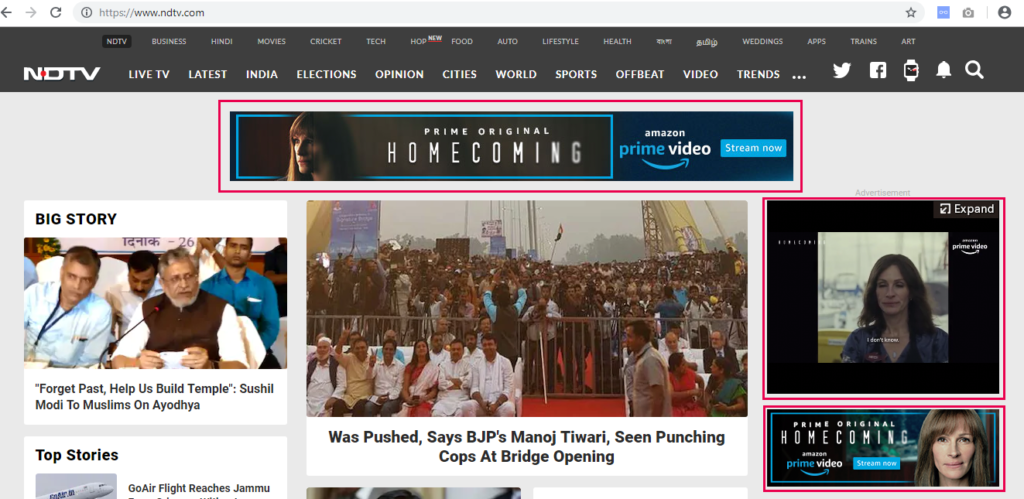
When I started Digital Marketing 6 Years back, I was working as a client servicing executive with an agency and I was asked to run Google Adwords campaign, I was new to adwords and I thought it’s difficult and complicated but then I understood the fundamentals and I realised that it’s simple and an effective channel for Digital Marketing. Adwords was launched on 23rd October 2000. Salar Kamangar was the one who introduced the concept of Google Adwords, he was the first business executive who saw the opportunity and created Adwords. Scott Banister then came up with an idea of advertising on search results with keyword based targeting. Today, Adwords is used by most by more than 1 million advertisers across globe to market their products, to reach out to the target audience, create awareness, increase leads and sales through online media. Google Adwords is now known as Google Ads! This article will help you to understand what is Google Adwords / Ads and also understand few fundamentals of Google Adwords. So What is Google Adwords? Google Adwords is an advertising platform by Google to advertise on Google Search and Google Partner Websites (Google Display Network). Google’s maximum revenue comes from Google Adwords as advertisers need to pay to Google to advertise through Google AdWords. Advanced Google Adwords Course by Rahul Gadekar – Access Now Different Types of Google Ads in Google Adwords: Search Ads Display Ads Video Ads Shopping Ads Universal App Ads 1. Google Search Ads Google Search Ads are ads that trigger when someone searches on Google Search. Advertisers can select on which keywords they want to trigger the ads and on which keywords they don’t. On Google Search there are total 7 Ads on a single page, 4 Ads on the top and 3 ads at the bottom of Search Results. For Eg: When an user searches for “Resorts in Kabini” on Google search, the search results will look something like this. (Image Source: Google) So How Does Google Adwords Work? Google Adwords work on a Real-Time Bidding (RTB) Model. Real-Time Bidding refers to buying and selling of online ads through real-time auctions that occur in the time it takes a webpage to load. Advantages of Search Ads: Pull Marketing: Search Ads are pull based ads where the users are searching for products or services on Google, so they are actively looking for products or services. Businesses get an opportunity to showcase their ads to them, be visible to their target audience, generate traffic and increase conversions. Keyword Based Targeting: Search Ads are purely targeted basis the keywords, advertisers can select on which keywords then want to advertise and which they don’t. Therefore search ads become an highly targeting channel for Digital Marketing. High Conversion Rate: Search Ads always have high conversion rate because users are actively looking for products and services, so the users who are searching will always have a higher chance of conversion over push base marketing. Less Wastage of Budgets: As Search Ads give an opportunity to target basis the keywords, the percentage of budget wasted is very less. So advertisers can effectively use their budgets on search ads to drive higher ROI will low Cost Per Acquisition. Direct Calls to Business: Through Search Ads on Mobile devices, advertisers can directly setup mobile no’s to an ad, this helps users to directly call to the business once they click the ad. Direct calls are very useful for local business including Restaurants, Spas, Saloon’s etc. 2. Google Display Ads You must have noticed display ads when you browse websites. They appear on right, top, bottom and in between the content of the page. Display ads are also called as banner ads or image ads. Below is an example of Display Ad. Display Ad which has “i” on the right hand side is an ad which is triggered through Google Ads. Ads which don’t have an “i” on the right hand side of an ad is not triggered through Google. (Image Source: NDTV) Display Ads are triggered basis different targeting options including Keywords, Websites, Interests, Topics etc. Display ads only appear on those websites which are supported with advertising. If a publisher wants to monetize their website through Google Ads, in that case they should be have a Google Adsense code enabled on their website. Advantages of Google Display Ads Push Marketing: Google Display ads are push based ads where advertisers can target their audience basis their interest, topic, websites, keywords etc. By pushing these ads in the content pieces of the target audience, advertisers can reach out to a wider audience, create awareness about the brand/product/service, leading it to conversions. Build Brand: If a business is new in the market, the business needs to be visible to the target audience and communicate the brand message. Display ads are powerful format of ads which helps brands to build brand by pushing the brand aggressively on digital media. Many advertisers also buy home page inventory directly from the publishers when they are launching their products. Brand Recall: Display Ads help to target users multiple times when they are browsing online, this helps to increase brand recall. Advertisers can target same users on cross devices and also target them on YouTube building an engagement with the brand. Remarket Users: Display Ads helps advertisers to remarket their audience who have visited their website. Remarketing ads can also be termed as reminder ads to the users who were interested in the products which they visited online. Remarketing ads helps to increase conversion rates online and are considered as an effective way of marketing products online. 3. Google Video Ads Google Video Ads are Video ads which run on YouTube and Google Partner Sites. Video ads are push marketing ads which are targeted with audience interest, topics, youtube channels etc. Video Ads are a good way to showcase product demo videos, brand video, customer testimonials, how to do videos, case studies etc. Videos are about telling a story to
What is Digital Marketing

Digital Marketing is one of the trending topics in Marketing over the past few years and it’s going to be the key channel for marketing in the coming years. Every business want’s to adopt Digital Marketing, hire Digital Marketing professionals and increase ROI through Digital Marketing. Also many professionals from Sales, IT and other domains are switching to Digital Marketing as a career! Here’s how Google Search trends look for Digital Marketing which is increasing year on year! Get Free Introductory Digital Marketing Course by Rahul Gadekar – Access Now Total Projected US Digital Ad Spends (Digital Ad spends to reach $130 Billion by 2021 – Source: AppNexus) So let’s understand in detail, What is Digital Marketing! Digital Marketing Definition Digital Marketing is a form of marketing products or services through electronic media or internet! Before we deep dive into Digital Marketing, let’s understand, advantages of Digital Marketing over Traditional Marketing! (Traditional Marketing includes newspaper ads, magazine ads, hoarding ads etc) Advantages of Digital Marketing over Traditional Marketing! Precise Targeting: Digital Marketing allows advertisers to target their audience precisely including age, gender, interest, topics, keywords, websites, city, pin code etc. It is very precise compared to traditional media where it’s difficult to target the audience basis the above parameters. Real Time Optimization: Through Digital Marketing we can optimize (make changes) our advertising campaigns on real time which means if the strategy is not working, we can immediately switch to another strategy, whereas in traditional form of marketing, once our ad is released you can’t make changes to it. Measurable: Digital Marketing is measurable, we can easily understand how many users our ads have reached to, how many people clicked our ads, how many people got converted from our ad, how much time people are spending on our website, how many pages they are visiting on website, how much is the time lag for conversion and so on, whereas in traditional media, it’s impossible to measure different parameters. Build Engagement: Digital Marketing helps brands to build engagement with their consumers, it helps to interact with the users on real time basis through social media. Brands can stay connected with consumers on real time and engage them with their brand communication throughout the journey of their businesses. Personalized Communication: One of the best advantages of Digital Marketing is that you can personalize communication to each and every user on digital, this helps advertisers to communicate with their audience effectively, understanding their requirement and delivering key messages to individual users which further helps in achieving brand objectives. Cost Effective: Digital Marketing is cost effective, you only pay for clicks or for the no of times you ad has been triggered. You can start with any budget to advertise on Digital, this helps advertisers to test their marketing campaign on digital and further define their marketing strategy. You can reach to a wider audience compared to traditional media with a minimum budget which helps to cut down your overall marketing cost. Higher ROI: Digital Marketing has a higher ROI compared to traditional media, as the targeting is precise which helps you to reduce showing ads to irrelevant users helping you to achieve your business objective. Through digital you can also track users who have clicked you ad and convert them through different brand communication. Digital Marketing can be classified under Online Marketing and Offline Marketing channels. Digital Marketing – Online Marketing Channels: Search Engine Optimization Search Engine Marketing Social Media Marketing Pay Per Click Marketing Display Marketing Content Marketing Affiliate Marketing Email Marketing Video Marketing Mobile Marketing Let’s understand each of them: 1. Search Engine Optimization Search Engine Optimization is the process of ranking your website in organic/non-paid search results of search engines. The ranking of web pages in organic search results, depends on the below factors Content Strategy On Page Optimization Off Page Optimization 2. Search Engine Marketing Search Engine Marketing is the process of increasing visibility of your website through organic and paid search results In simple words SEM = SEO (Organic) + Paid Search Below screenshot shows the difference between paid search results and organic (SEO) search results on Google search Advanced Google Adwords Course by Rahul Gadekar – Access Now (To know more about Google Search Ads – Refer Article How to Create Google Search Ads) 3. Social Media Marketing Social Media Marketing involves usage of social media channels to promote products and services. Social Media Marketing Channels Includes Facebook Twitter YouTube LinkedIn Pinterest Snapchat Google Plus Social Media is a powerful channel to reach out to your audience, engage with your audience, interact with your audience etc, helping brands to have one on one conversations with their audience. 4. Pay Per Click Marketing Pay Per Click is often referred as PPC. Pay Per Click Marketing is a model of online marketing where an advertiser pays per click to the publisher, in this case it does not matter how many times the ad has been triggered. The advertiser will only pay for the no of clicks received on his ads. For eg: In the below screenshot, all 4 are PPC ads. So if any user clicks on any ad, the respective advertiser is bound to pay per click to Google 5. Display Marketing Display Marketing is marketing of products or services through image ads / banner ads / display ads. Display ads run on PPC model and CPM model. Ways to run Display Ads! Google Ads / Google AdWords – Running through Google’s ad platform Direct Buy – Directly connecting with the publisher to run the ads Ad Networks – Ad Networks are third party platforms who help to run ads on different publishers Eg: Komli, Tyro, InMobi etc Programmatic Ads – Programmatic Ads are automation of buying and selling of display ads, video ads, rich media ads etc using real time bidding. So how does one differentiate between Google display ad and Non Google display ad? Below screenshot shows an ad which has an i marked on the
YouTube లంబ వీడియో ప్రకటనలను ప్రారంభించింది
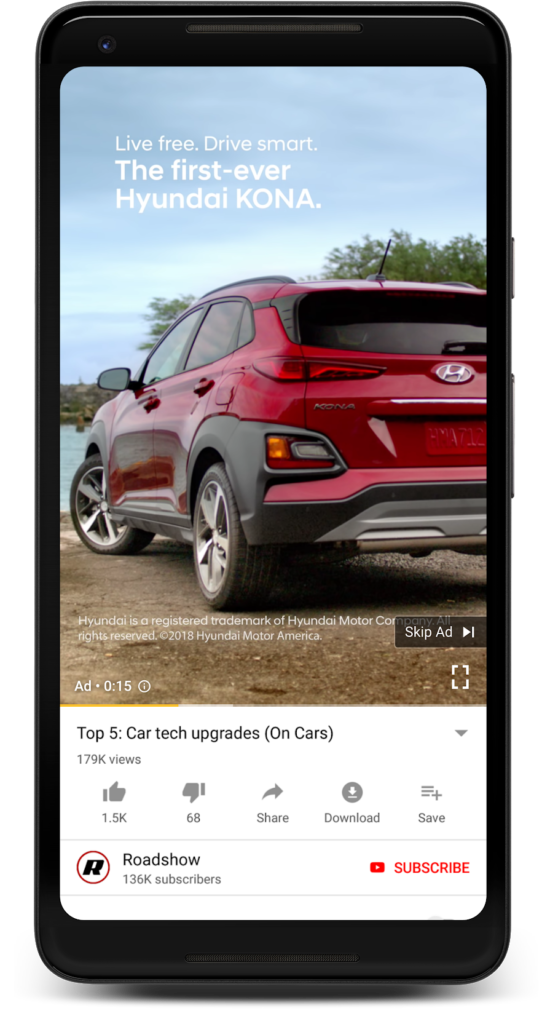
వీడియో కంటెంట్ డిమాండ్ నిరంతరం పెరుగుతోంది మరియు బ్రాండ్లు ఒక పెద్ద మార్గంలో ఈ బంధం మీద కదులుతున్నాయి. టెక్నాలజీ సౌలభ్యంతో, చౌకైన డేటా రేట్లు మరియు భారత మార్కెట్లో లోతైన స్మార్ట్ఫోన్ ప్రవేశించడం, మొబైల్ వీడియో వినియోగం గణనీయంగా పెరుగుతోంది. మీడియా ఏజెన్సీ జెనిత్ నివేదిక ప్రకారం, ఆన్లైన్లో చూస్తున్న ఒక భారతీయ వీడియోల ద్వారా సగటున గడిపిన సగటు సమయం 2018 లో రోజుకు కేవలం రెండు నిమిషాల నుండి 52 నిమిషాలకు పెరిగింది. రోజుకు 67 నిమిషాలు 2019. Instagram iGtv తో నిలువు వీడియో మార్గం వెళుతున్న తో, నిలువు వీడియోలు అలాగే YouTube వచ్చింది మాత్రమే సమయం. ఇటీవల, యూనివర్సల్ మరియు ట్రూ వ్యూ అప్లికేషన్ ప్రచారాలలో YouTube లంబ వీడియోలను ప్రారంభించారు. ప్రపంచవ్యాప్తంగా స్మార్ట్ఫోన్లను ప్రసారం చేసే వీడియో వీక్షణల్లో 75% పైగా, YouTube స్వయంచాలకంగా మొబైల్ స్క్రీన్ పరిమాణాలకు సరిపోయే ప్రకటన ఆకృతులను సవరించింది. “ఇది వినియోగదారుల తెరపై కీలకమైన విజువల్స్ను ఆక్రమిస్తాయి, అత్యంత ప్రభావవంతమైన మార్గాల్లో వారి మార్కెటింగ్ సందేశాన్ని ప్రసారం చేసే అవకాశాన్ని పొందుతుంది, ఎందుకంటే ఇది ప్రకటనదారులను సంతోషిస్తుంది” అని నీల్ మోహన్, ది చీఫ్ ప్రొడక్షన్ ఆఫీసర్ YouTube లో పేర్కొన్నారు. “ఈ రోజుల్లో, వీడియో కంటెంట్ విషయానికి వస్తే వినియోగదారులకు ఎంపిక చేయబడవచ్చు. కొనుగోలుదారుల కోసం కొనుగోలు మార్గం నిర్మించడానికి మంచి కంటెంట్ వంటి ఉత్పత్తి & బ్రాండ్ వీడియోలు ద్వారా కొనుగోలు నిర్ణయాలు పెద్ద భాగంగా నిర్మించబడ్డాయి “నీల్ చెప్పారు. ప్రతి నిమిషానికి 400+ గంటల వీడియో కంటెంట్ను YouTube లో అప్లోడ్ చేయబడుతుంది. నీల్ మోహన్ ప్రస్తావిస్తూ, “YouTube ఇప్పుడు నూతన నూతన ఉత్పత్తులలో పెట్టుబడి పెట్టింది, ఇది ప్రకటనకర్తలు వారి ప్రేక్షకులతో మెరుగైన పద్ధతిలో పాల్గొనడానికి సహాయపడుతుంది. ఇది గత ఏడాది మాత్రమే YouTube దాని మొబైల్ అనువర్తనం అనుసంధానించింది, వీడియోల ఆధిపత్య స్థానాలకు ఆటోమేటిక్గా గ్రహించి, ఆప్టిమైజ్ చేసిన మెరుగైన మద్దతు ఉన్న నిలువు వీడియోలను అందిస్తుంది. కూడా, మేము YouTube లో, పూర్తి కాన్వాస్ యొక్క లాభం కోరుకున్నాడు మరియు అది వైపు ఆ బోరింగ్ నల్లని బార్లు అందించే సమాంతర లేఅవుట్ లోకి butted లేదు, ” ఆటోమోటివ్ దిగ్గజం హ్యుందాయ్ కొత్త ప్రకటన ఫార్మాట్ ప్రయోగాలు మొదటి ఒకటిగా జరుగుతుంది. బ్రాండ్ అవగాహనలో 33 శాతం పెరిగాయని, 12 శాతం పెంపును పరిశీలిస్తున్నట్లు ఆటోమేకర్ ధృవీకరించింది. వినియోగదారుడు ఫీడ్ లలో బ్రాండ్లు వెంటనే కొనుగోలు చేయగలరని, వ్యక్తి యొక్క వ్యక్తిగతీకరించిన కంటెంట్ ఫీడ్కు వ్యతిరేకంగా ఉపశమనం కోసం అనుమతించడం కూడా యుట్యూబ్ ప్రకటించింది. నీల్ ప్రకారం, YouTube హోమ్ ఫీడ్లో గడిపిన సమయ సిఫార్సులను చూడటానికి గత 3 సంవత్సరాలలో మూడింతలు చేసింది. YouTube లంబ వీడియో ప్రకటనలు మద్దతు కారక నిష్పత్తులు: స్క్వేర్: 1: 1 నిలువు: 9:16 ల్యాండ్స్కేప్: 16: 9 లెట్ యొక్క వెళ్ళి లెట్!

