
Guide To Facebook Remarketing Ads To Increase Conversions
As we know that remarketing is a tactic where you follow your customers online once they have visited your website. Remarketing tatic is very effective to increase brand recall and increase conversions on your website. Before you move ahead with Facebook remarketing ads, it’s very important for you to know, what is remarketing concept & how it Works! To know more about Remarketing concept and how it works – Refer article, Guide To Remarketing in Digital Marketing So What is Facebook Remarketing? Facebook remarketing is showing ads to users on Facebook network once they have visited your website or interacted with your Facebook page. These ads will only be shown on Facebook network which also includes Instagram. So How to Set Up Facebook Remarketing Ads Campaign? In the article we will understand step by step, how to set up remarketing for Facebook ads. So let’s get started! Step 1 The first important step to start with Facebook remarketing ads is to set up Facebook remarketing pixel. If you have not added Facebook pixel on your website, you won’t be able to remarket uses on Facebook network. To know about How to Set Up Facebook Pixel – Refer article, Guide To Set Up Facebook Pixel Step 2 The next step once you have added the Facebook pixel on your website is creating audiences. Audiences is also called as remarketing lists. In order to set up audiences in Facebook, go to audiences under business settings as below Step 3 Once you click on audiences, you will see an option, create audiences. Under create audience, you have three options as below: Custom Audience Lookalike Audience Saved Audience Let’s understand each one of them. 1. Custom Audience Custom audience allows you to define custom audience list as per your requirement. In this article I am going to create a custom audience list for the users who have visited my website but have not converted on the website. This will help you to understand how to create custom audience list for your campaigns. So once you click on custom audience under create audience option, you will see the below screen, from where you need to select a source to create custom audience. There are 10 different sources to choose from Website Traffic Customer List App Activity Offline Activity Video Instagram Business Profile Lead Form Events Instant Experiences Facebook Page Let’s understand each source! a. Website Traffic If you go with website traffic source, you will be able to set audiences/remarketing lists of users who have visited your website This is one of the most commonly used source types, because it allows you to remarket users who have not converted on your website. Businesses who can use website traffic are Real Estate, Education Institutions, Hospitality, Travel, Ecommerce etc. b. Customer List With this source type, if you have a database of your customers or prospects, you can upload it on Facebook (including email address and phone number) and remarket them on Facebook, if they have Facebook accounts with the same email address and a contact number. Customer list source type can be used, if you have collected database from an offline event and then you want to remarket users on Facebook network. c. App Activity With this source type, you can remarket users who have visited your mobile application of who have taken a specific action on your mobile app. Eg: purchased a product, added a product to the cart etc. App activity source type is very useful for businesses who are offering products, services etc through mobile application. Eg. Ecommerce businesses, Mobile games, Learning apps d. Offline Activity With this source type, you can remarket users who have interacted with your business in-store, over the phone or by other offline channels. Businesses who have offline stores can use this effectively by targeting a radius of their store, to advertise on Facebook network. e. Video With video source type, you can remarket users who have viewed your video on Facebook or Instagram. Brands who are creating video content can use this source type effectively to remarket users who have already watched videos of their brand. f. Instagram Business Profile In this source type, you can create a list of users who have visited or interacted with Instagram profile or an Instagram ads. This source type is effective if you are marketing products or services which are into Travel, fashion, lifestyle etc g. Lead Form Through this source type, you can remarket users who have clicked on your form or who have not submitted a form or who have opened and submitted a form. This source type is very effective is you are running lead generation ads on Facebook and you want to remarket your ads to those users who have interacted with your ad but have not filled up the form. h. Events With this source type, you can create audiences and remarket users who have interacted with your event page on Facebook. This source type is useful, if you are promoting an event and you want to target users who have engaged with your event page. i. Instant Experience With Instant experience source type, you can create an audience list, who have interacted with your instant experience on Facebook or Instagram profile. j. Facebook Page With this source type, you can create an audience list of users who have interacted with your Facebook Page, Facebook posts or who have liked your page. This source type is very effective, if you are looking to increase engagement of your Facebook page by reaching out to those users who have interacted with your business page. If you are regularly creating impactful content, this is the source type you should go with. As I want to remarket users who have visited my website and have not converted on my website, I am going with website traffic as the source type. Once I click website traffic, I can see the below screen. Here I need to define the
Guide To Set Up Facebook Pixel To Track Conversions
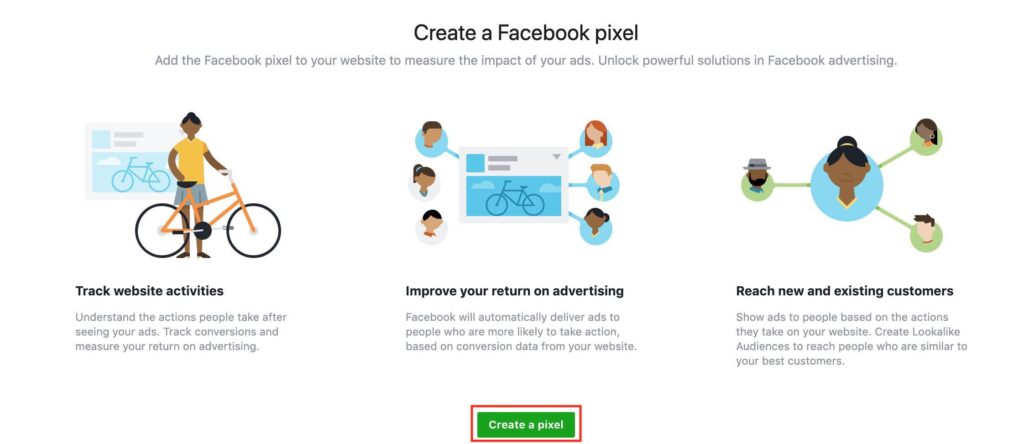
Understanding how your Facebook ads campaigns are performing is very important to measure the success of a campaign and further optimize to grow your business, that’s when Facebook pixel comes into the picture! So What is Facebook Pixel Facebook pixel is a snippet of code which is used to track conversions, track events, track actions and track audiences. Facebook pixel code is to be added on the head section of the website. This code works as a conversion tracking code and remarketing code for your Facebook ads. This guide will help you to understand how to create facebook pixel step by step. So let’s get started! So How to Create Facebook Pixel? Step 1 To create Facebook pixel, login to your Facebook business manager account or your Facebook ad account If you don’t have a Facebook business manager account – Refer article, Master Guide To Facebook Business Manager Account Step 2 Now click on Pixel from business settings drop down of your dashboard as below Step 3 Once you click on pixels, you will see the below screen. Now say create pixel by clicking on the green button. Step 4 Once you click on create a pixel, you will see the below screen. Now enter pixel name and your website URL. I have entered as per my business name. Step 5 Once you say create, you will see three options as below to install pixel. Connect a Partner Platform Manually Install Pixel Code Yourself Email Instructions To a Developer Let’s understand each one in detail. 1. Connect a partner Platform With this option you can you can install a pixel without a code snippet, by connecting a platform you already use, like shopify, tag manager, wix etc. Below are the platforms you can connect with Facebook. To know more about Facebook partner integrations – Refer article, Facebook Partner Integrations 2.Manually Install Pixel Code Yourself This option is the most commonly used to install pixel. So once you click on manually install pixel code, you will come across below screen. Install the first code in your head section by just copying the code from the screen and pasting it in your head section. Post that, you will see the second code. You need to again install this code in the head section of your website. The next thing is to switch on the automatic advanced matching option. If you switch on this option, you can use customers information like email address or phone number, to reamarket them on Facebook network. The next thing on the screen you will see an option as send test traffic to your pixel. Here you can add your website url and say send test traffic. Always remember, once the code is added, post that only you will be able to track conversions and other events. So once you have added the code the red mark in the below screen will change to green colour, which means the code is activated. (Note: This process might take few hours) Now say continue. Once you move ahead in the process, you will come across the next step as Set Up Events. In set up events, you will see two options as below Use Facebook’s event setup tool Manually install event code Let’s understand each one of them! Use Facebook’s event setup tool: With this option, you can add or edit events directly on your website screen with no coding required at all. Once you click on use facebook’s event set up tool, you will come across below screen. Enter the website URL and then click open website. Once you have clicked open website button. You will come across below screen. Once you click on next button, you will see the below option on your left hand side of the screen. Once you click on track new button, you will see the below screen. Here you can click on the highlighted button to set up your event. So for example, I am clicking on the course button, because I want to understand how many users are viewing my content under course tab. Once I click on the course, I can see an option with a drop down on the left hand side. As I want to understand users who have viewed my content under the course tab, I am selecting view content option in the drop down. You can also select basis your requirements from the available options in the drop down. Once you have selected an event say confirm. I have selected view content, so I am confirming the same as below. Once you have confirmed you will see the below screen with green tick mark on the button who have defined the event on. Now you can further set up additional events for different buttons on your website. Manually Install Event Code If you want to do it manually, you can use the codes for each event and then paste it on your website. If you don’t have much understanding of website development, ask your developer to do so. Once you click on manually install event codes. You will come across each event as below; Add payment info Add to Cart Add to wishlist Complete registration Contact Customise product Donate Find location Initiate checkout Lead Purchase schedule Search Start trial Submit application Subscribe View content Below is the description for each event and codes for each event. You can use the code and add it manually to your website. 3.Email Instructions to a Developer In this option you can directly mail the code to the developer and ask him to add it in the head section of your website. Step 6 Now after you have added the code in the head section. This code is going to work as a conversion tracking code and remarketing code. Now the key part here is, the conversion code has to be on the thank you page of the website, whereas our Facebook code which we have added is on the
Guide To Create Facebook Ads To Grow Your Business

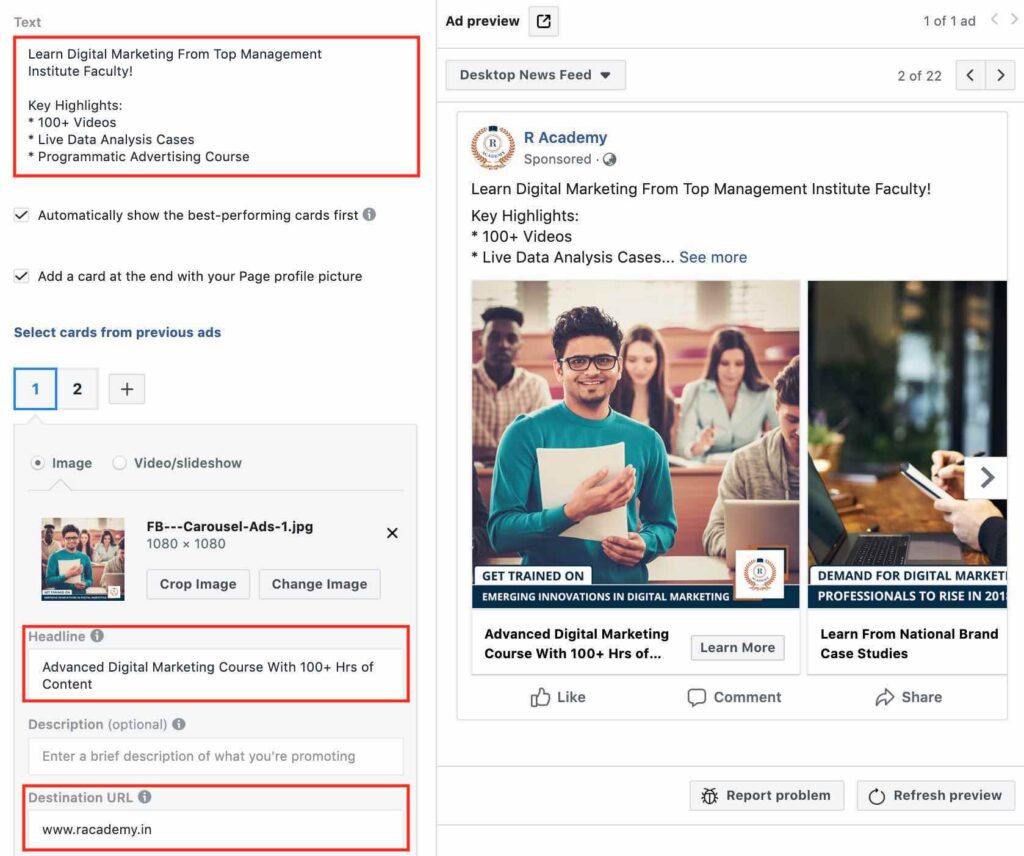
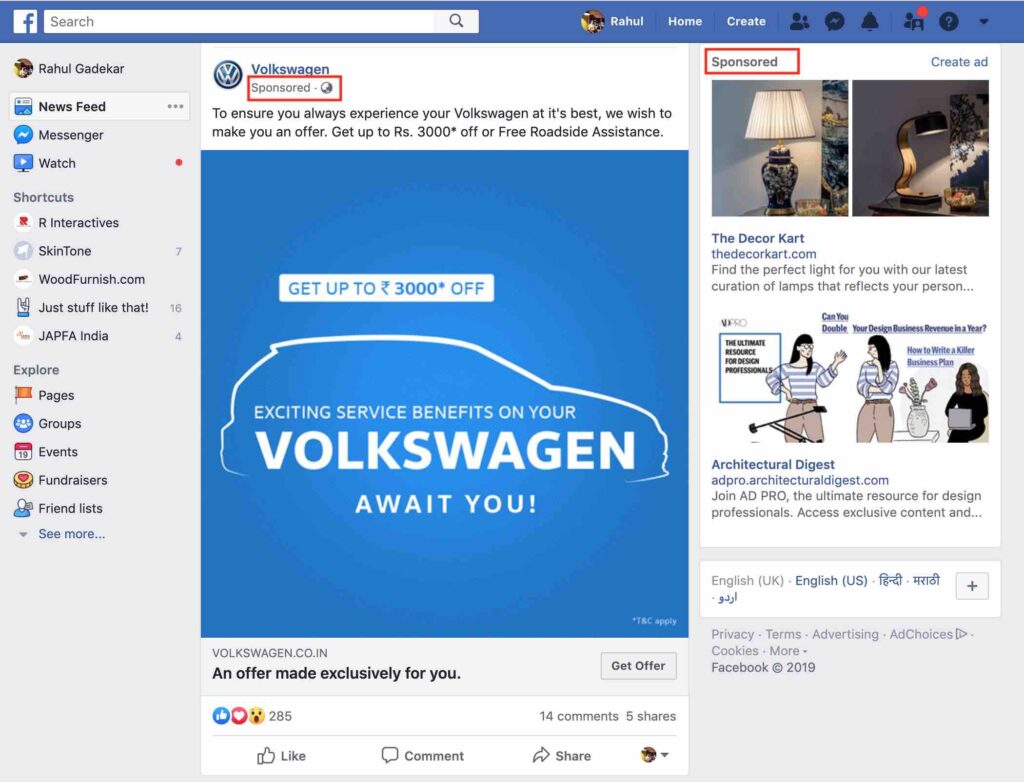
Facebook has become one of the most effective advertising platforms after Google Ads, to promote your business online. Facebook helps you to reach a wider audience on facebook network, engage with them and generate sales for your business. So What Are Facebook Ads? Facebook ads are ads which appear on Facebook and Facebook network when targeted through different targeting methods available on Facebook. These ads are Image based ads Video Ads Carousel Ads Product Ads Advanced Facebook Advertising Course by Rahul Gadekar – Access Now So Where Do Facebook Ads Appear? Facebook Ads appear on Facebook in your news feed. Below is an example of Facebook ad in Desktop news feed. You can see a sponsored mentioned whenever you see an ad on your news feed. The right hand side ad is called as the right hand side desktop ad. Below is an example of mobile ad on facebook Advantages of Facebook Ads! Facebook ads have several benefits which are as below: Reach Facebook has around 1.6 Billion users every day and most of the users spend on an average 30mins of facebook every day, so the opportunity to reach your audience on Facebook is high. Awareness When you are launching a new product, new service, new business etc, the first most important thing is to create awareness with the target audience of your brand. As the reach is high on Facebook, you have a high potential to reach them and make them aware about your business. Engagement Many brands do use Facebook for engaging with their audience. When you are creating different content pieces and sharing on Facebook, it’s important that users engage with the content pieces. Engagement depends on the content, but Facebook ads help you to reach a wider audience which further improves your engagement. Traffic Business like news websites, bloggers, content publishers etc are looking at Facebook to drive more traffic by reaching out to audience with Facebook ads. For any business the first important parameter after reach would be to drive relevant users to website, so Facebook helps in doing that. Leads/Sales Facebook has also become one of the key channels for lead generation and generating sales for business owners. Businesses like real estate, education, ecommerce etc are using Facebook to generate leads and sales as you can target users effectively. In order to start with Facebook Advertising you need Facebook ads account. I would recommend you to create Facebook Business Manager Account which helps you to manage multiple ad accounts and multiple Facebook pages through a single platform. To know more about, How to Setup Facebook Business Manager – Refer article, Master Guide To Facebook Business Manager Account Before we start with creating Facebook ads, it’s important for you to understand the campaign structure in Facebook Ads. So What is Facebook Ads Campaign Structure? Facebook campaign structure is the hierarchy of your ad campaign where you define goals, budgets, targeting, placements, bids, ad copy etc at different levels of the campaign. So How is the Facebook Ads Campaign Structure defined? Facebook ads campaign structure is defined at three levels as below Campaign Ad Sets Ad Copy Campaign – At campaign level you define the objective of the campaign which could be leads, engagement, traffic, conversion, video views etc Ad Sets – At ad sets level you define the budget, bid, targeting methods, placements, scheduling etc Ad Copy – At ad copy level you define your creative, images, copies, videos, product catalogs etc Below is how the Facebook ads campaign structure looks like Let’s now understand How To Create Facebook Ads step by step In this article I am going to take an example of my training academy which offers online Digital Marketing Course, so I am going to show you how to create Facebook Ads Campaign for the course including all the aspects of facebook ads. So How To Create Facebook Ads Campaign? Let’s understand step by step to create facebook ads campaign. Step 1: Login to your Facebook ads account. Once you have logged in to your Facebook ads account, click on ads manager under business setting as below Step 2: Once you click on ads manager account, you will see the below screen. Here you need to define the objective for your campaign. There are 11 objectives on Facebook which you can define while running Facebook ads, you need to select the objective basis your objective of running ads on Facebook. Let’s first understand each objective! 1. Brand Awareness You can select this objective when you want to create awareness about your business/brand/product/service. If you are new in the business or have launched a new product or if your product is not known in the market, then you can go ahead with this objective. 2. Reach If you want to reach a wider audience on Facebook, you can go ahead with reach objective 3.Traffic If you want to drive more visitors to your website or mobile app or blog, you can go ahead with traffic as an objective. Traffic objective is useful when you are new in the market, so you can drive users to your web page to know more about your business. 4.Engagement If you are looking at users which is interaction on your posts or event pages or offers, you can go ahead with Engagement. Engagement includes, likes, comments, shares, offer claims or event responses. Under engagement, there are 3 subtypes which includes post engagement, page likes and event responses. Post Engagement – If you have created a content piece for a post and you want users to like comment and share, then you can go ahead with this engagement subtype Page Likes – If you want to increase likes for your Facebook Page, you can go ahead with this engagement subtype. Event Responses – If you have created a new event and you are looking to promote the event with responses, then you can go ahead with this engagement subtype. Any business can use this type of objective
Master Guide to Facebook Business Manager Account in 2022
Facebook Advertising is one of the most popular advertising channels after Google Ads. In order to advertise on Facebook network, you need an ad account, that’s when Facebook Business Manager comes into the picture. There are two types of Facebook Ad Accounts. Personal Ad Account Business Manager Account So What is Facebook Personal Ad Account: Facebook personal ad account allows you to create ads on Facebook and target users on facebook with different targeting methods. But if you are a business, you should not create personal ad account because you won’t be able to share your personal ad account access to any other user. This means that you will have to share your personal email id and password to the user who wants to view and create ad campaigns on Facebook. I won’t recommend you to go with Facebook personal ad account if you are a business! You should always go with Facebook Business Manager Account. So What is Facebook Business Manager Account? Facebook business manager account is an account through which you can manage, multiple business manager account, multiple ad accounts within a business manager account, multiple facebook page and users associated with each account. It’s a single stop platform for Facebook and Instagram advertising with multi-user access and multi-agency access. You can also add other assets like product catalog, add multiple facebook pages, multiple instagram accounts etc to your business manager account. This article will guide you step by step, to set up facebook business manager account. Let’s get started! Advanced Facebook Advertising Course by Rahul Gadekar – Access Now So How To Set up Facebook Business Manager Account? In order to set up facebook business manager account, it’s important to have a facebook profile. If you don’t have a facebook profile, do create a new email id, then create a facebook profile to get started with Business Manager Account. Step 1: Once you have logged in with your facebook profile sign in details, go to business.facebook.com. You will see the below screen, now click on create account. Step 2: Once you click on create account, you will see the below screen, so fill up the details as per below fields. Your Business & Account Name This should be the name of the business for which you are creating the business manager account. Your Name This can be your personal name Your Business Email Address This should be the email address through which you would like to create the Facebook Business Manager account. Do note that the email Id which you are using should not hold any business manager account. Step 3: The next step is to fill in your business details including address, phone no, website etc. Here is the video which demonstrates, how to create Facebook Business Manager Account Step 4 Once you have filled up the above details, your Facebook Business manager account is created. You will see the below screen after account creation. Next step is to add a Facebook Page to your business manager account. Why do we need a facebook page is because, without a facebook page you won’t be able to advertise on facebook, so a facebook page is mandatory. So once I click on the add page (refer above screenshot), you will see the below three options to add a page Add A Page You Own Add Someone Else’s Page Create A New Page Add A Page You Own Through this option you can add any page you manage to your Facebook Business Manager Account Add Someone Else’s Page Through this option you can request permission to a facebook page to add to your business manager account Create A New Page If you don’t have any page, then you’ll have to create a new one to get started with Facebook ads. I am going with the first option, Add A Page You Own, as I have a Facebook page. So click on the add page and search for the page which you would like to add to your business account as below. Once you have clicked add page blue button, the page owner will receive the request as below on their facebook profile, and once the request is accepted the Facebook page is added to your business manager account. Step 5: The next step is to add ad account. To add ad account, click on the add ad account button as below Once you click on the add ad account button, you will see 3 options as below to add ad accounts to your business manager Add An Ad Account You Own Add Someone Else’s Ad Account Create A New Ad Account Let’s understand each one of them Add An Ad Account You Own Add an ad account you own option will help you to add an account which you already own. Add Someone Else’s Ad Account Add someone else’s ad account will help you to add other ad accounts to your business manager by sending them a request. This option is applicable if you are a Freelancer, Agency or a Consultant, where you would be running ads & managing them on behalf of your client. Create A New Ad Account If you don’t have any ad account, then you need to create one to run ads. So create a new one to start Facebook advertising. I am going to create a new ad account, as I want to show you how to create a new ad account. So once I click Create Ad Account, I can see the below options. I have filled in the details as per my account name, geography & time zone, you can also set the details as per your geography and time zone, but do make sure you set them right in the first go, because you won’t be allowed to change it later. Once I click next, I need to select from the below option which says, this ad account be used for ? So I have selected My Business because I
Google Search Ads Performance Measurement & Optimization Guide
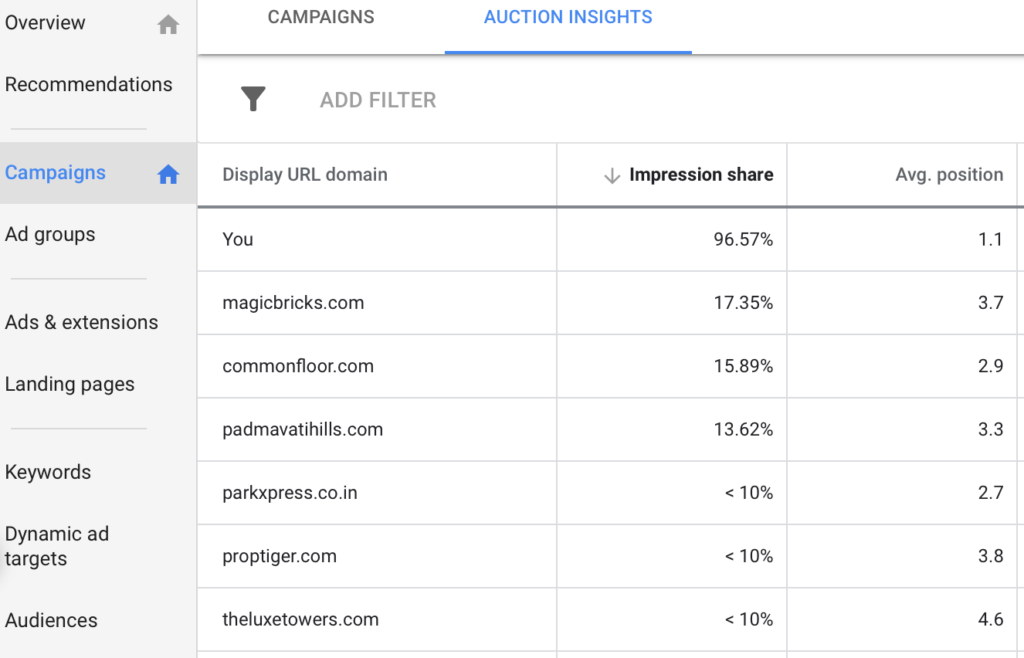
If you are advertising your business on Google Search Ads, it’s important for you to understand if the campaigns are running effectively, and if the campaigns are driving results or not. In this article, we will understand the key metrics to look at while measuring performance for your search ads and also we will understand how to optimize them to improve results. I will take you through 3 Google Ads account actual data to understand Google search ads performance measurement & optimization in detail. So let’s get started! Here are the key metrics and parameters you should measure & optimize for your search ads! 1. Average Position The first important metric to look at in search campaign is it’s average position. The average position is available on the summary dashboard of Google Ads account. Below is an example of one of my Google Ad accounts where you can see that the average position is 1.1 or 1.2 in most of the cases. This means that my ad is ranking on the first position most of the time. Position of anything less than 1.5 is a good position for search ads Average Position – Ad Account 1 Below is another example from another Google Ads accounts, where you can see that the average position is 3.0. Average Position – Ad Account 2 Average Position – Ad Account 3 Now example 2, the average position is 3 and in example 3 the average position of few campaigns is 4.0 and 3.0, which is very low. If my ad is ranking at no 3 or no 4, my ads would receive low clicks. A good average position for search campaign should be anything less than 1.5 2. CTR The next metric to look at is CTR. Let’s have a look at CTR for all the above 3 examples CTR – Ad Account 1 You can see different CTR’s for all campaigns below, few of the campaigns have CTR 5.87%, 4.42%, 10.66% and so on CTR – Ad Account 2 In this ad account, I have only 1 campaign. We can see that the CTR is around 7.31% CTR – Ad Account 3 In this ad account, you can see different CTR’s for different campaigns including 4.63%, 2.60%, 2.18% and so on CTR for any search campaign should be minimum 5%, if you are observing CTR less than 5%, then it means that the keywords targeted are not business keywords. 3. Keywords The next parameter to look at, are keywords in the campaign which have received clicks. So let’s view all the 3 Ad accounts, keyword report. You can view the keywords report of any campaign by clicking on the campaign and then clicking on the keywords tab on the left hand side (refer below) In the keywords report for any campaign, we need to look at the impressions, clicks, CTR, CPC, Avg position, conversions etc. Keywords of Ad Account 1 Through keywords report, I can understand which keywords have generated clicks for my campaign, what is the CPC of those keywords, what is the CTR, Avg Position for each keyword and so on. Keywords of Ad Account 2 Keywords of Ad Account 3 When you are reading the keywords report, look at the keywords which are driving maximum clicks to your landing page, also look at the keyword average position and CTR of your keyword. For Eg: In Ad Account 3, you can see keyword b has an average position of 4.9 and CTR of 3.29%, so both the metrics are low, we need to increase the average position to 1.5 and CTR also should be above 5% by optimization of the campaign. 4. Search Term Report The next aspect to look at is search term report. Search term report is under keywords option, you need to click search terms which is next to negative keywords. So What is a Search Terms report? Search Terms report is a report of the queries which users searched on Google, which generated clicks for your Google Search ads campaign. This is one of the important reports in Google search campaigns because it helps you to understand the queries which generated clicks for the campaign. From these reports, if you see any queries which are irrelevant to your business, in that case you should add these queries as negatives in your campaign, so that your ads don’t trigger again for those keywords which are irrelevant. You should regularly check search terms report because, it helps you to understand if your budget is getting consumed on the right keywords which are your business keywords. You can also increase bids of keywords if you see that these keywords are driving results. As in the search report of below example of Ad Account 1, I can see that search term D is driving conversions, so I can take a call to increase the bid of that particular keyword, so that keyword participates in the auction with higher bidding to drive more conversions. Search Term Report – Ad Account 1 Search Term Report – Ad Account 2 Search Term Report – Ad Account 3 In search term report of ad account 3, you can see that the average position of search term A is 3.5 but it is driving conversions, so again you can take a call of increasing bidding to be more aggressive for these keywords on Google search. Now basis above examples, you must have observed that increasing average position leads to higher CTR. Higher CTR means you are driving more users from your search ads to your landing page, which means there are higher chances of conversions. So let’s understand further how to improve average position. So How To Improve Search Campaign Average Position? In order to improve average position for your search campaigns, you need to look at the keywords report Keywords Report – Ad Account 3 If you look at the below keywords report, you can see the average position for each keyword, plus you can see
Ultimate Guide To YouTube Remarketing Ads
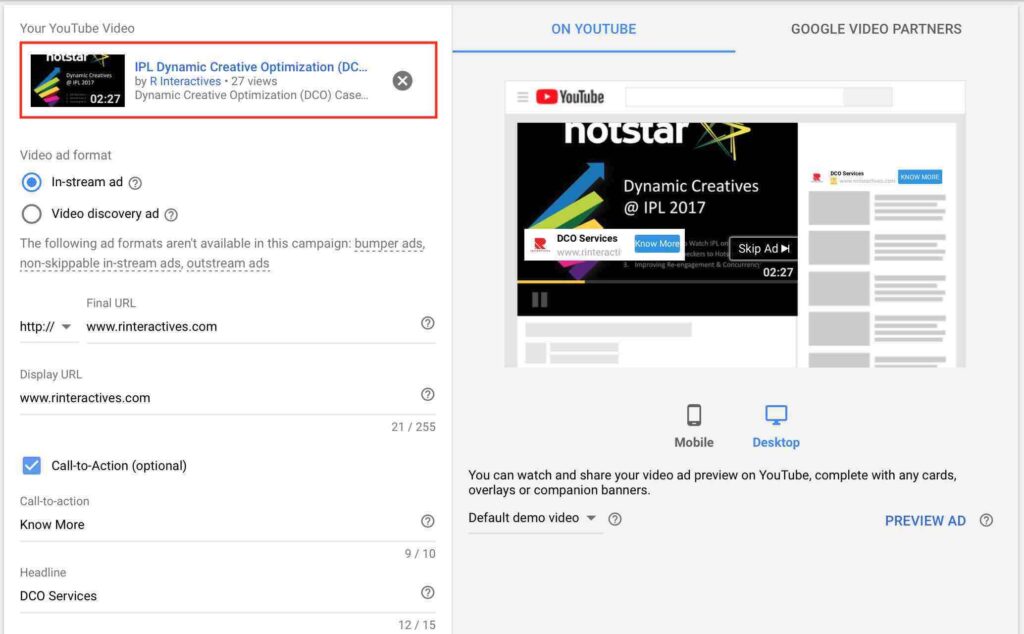
YouTube Remarketing Ads I have discussed earlier about Google Display Remarketing Ads and Google RLSA (remarketing for search ads), in my previous article, with a step by step guide to also create them in Google Ads. If you haven’t gone through them, I would recommend you to first go through them, before moving ahead with YouTube Remarketing Ads. Below are the links to access the articles. Introduction To Remarketing Guide To Google Display Remarketing Ads Guide to Remarketing Lists For Search Ads (RLSA) So What Are YouTube Remarketing Ads? YouTube remarketing ads are remarketing video ads which you can remarket to users on YouTube who have visited your channel or video or engaged with your content. So How To Create YouTube Remarketing Ads in Google Ads? Let’s understand in detail step by step to create YouTube Remarketing Ads. Step 1: The first step before creating YouTube campaign is to connect your YouTube channel with Google Ads. The reason you need to connect your channel with Google Ads is because, you need remarketing list to remarket and to create a remarketing list you need code to placed on the website. But as it’s a Youtube channel, you don’t need a code, and this can be done by connecting your YouTube channel to Google ads account. So How To Connect YouTube Channel With Google Ads Account? In order to connect your YouTube channel with Google Ads account, sign in to your YouTube account. If you don’t have the YouTube account permissions, tell the YouTube admin access holder to do the following. Go to settings YouTube and click channel, then click the advanced option. You will see link account on the right hand side as below Once you click the link account option, add the name of the Google Ads account and the CID no of Google Ads account as below: Post that click done. Now the request has gone to the Google ads account, so we need to accept the request in order to connect the Youtube channel to Google ads Account. Now go to your Google Ads account and click on Linked Accounts under tools option as below Once you click on linked accounts, go to YouTube and click on details as below Once you click on details, you will see the request has come to your Google ads. Refer below Now click on View Request and approve the request as below Once you approve the request, you will see that the YouTube channel has been linked to your Google Ads account as below. Step 2: Once the YouTube channel is linked, the next step is to create remarketing list. In order to create remarketing list, click on audience manager under tools option in your Google Ads account as below Now click the blue button and click YouTube users as below Once you click on Youtube users, you need to now create a YouTube remarketing list. So define the name of the YouTube remarketing list. I am going to create a list of all the users who have watched any video from my channel and then remarket them with a DCO case study video (which is on my channel). So I am naming the list as RI all users The next thing is to define the list members, which is one of the important steps of the process. List member means, the users whom you want to add to the list. There are 10 types of lists members to choose from to create a list. You need to define what list you want to make. Below are the types of list members Viewed any video from a channel Viewed certain videos Viewed any vide (as an ad) from a channel Viewed certain videos as ads Subscribed to a channel Visited a channel page Liked any video from a channel Added any video from a channel to a playlist Commented on any video from a channel Shared any video from a channel Let’s understand each list in detail: Viewed any video from a channel This list will create a list of audiences who have watched any video from your channel. For Eg: If I have 5 videos on my channel, users who watch any video, will be a part of the list. This becomes very generic because every video might be related to a different topic, so you can decide if you want to add all users in one list or bifurcate them. Viewed Certain Videos Viewed certain videos will allow you to create a list of users who have visited specific videos. This is a very apt list member type because it allows you to bifurcate users basis with what videos they have watched from your channel. Viewed any video (as an ad) from a channel This list allows you to create a list of users who have viewed any video as an ad on YouTube. When you are advertising on YouTube, this list type can be useful, as you would like to remarket users who have watched any video you are advertising. Viewed Certain Videos as ads Through this list type, you can create a list of users who have watched specific video as an ad. If you running a specific video which is for a set of audience as an ad, you can create a list of this audience and then use it to remarket for future videos in the same category. Subscribed to a channel Subscribed to a channel is a list type where you can add users who have subscribed to your YouTube channel. This list type is useful when you are regularly creating videos and would like to remarket to all the users who have subscribed to your channel. Liked any video from a channel This list type allows you to create a list of users who have liked any video of your channel. In this case you would like to connect to users in future who have liked your content on YouTube, so this
Different Revenue Models in Online Business
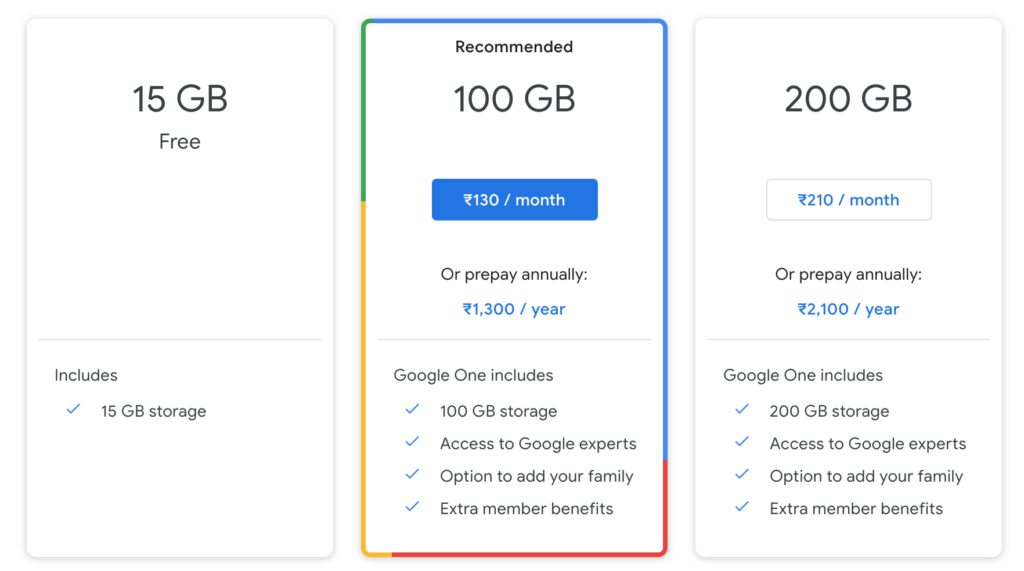
If you are new to Digital Marketing or planning to start your online business, it is important for you to understand different types of revenue models in online business. Different online companies have different revenue models basis their offering. The revenue model is defined by the company offering products/services basis a deep dive research and basis how much value they think, they would be able to create through their business from different models offering their services. This article will cover different types of revenue models in online business/online websites: To know more about different types of online websites, refer article – Types of Websites in Online Business Get Free Introductory Digital Marketing Course by Rahul Gadekar – Access Now So What is a Revenue Model? Revenue Model is a method through with a business earns money by offering it’s products/services/solutions to their customers Different Types of Revenue Models in Online Business? There are different types of revenue models in online business, let’s understand each one of them, in detail 1. Advertising Based Revenue Model One of the common revenue models in online business is advertising, it is also one of the oldest revenue models in online business. Here the online business is earning money from advertising options available on their website. Below are companies who work on advertising revenue model. Example of Advertising Revenue Model Search Ads – Google Video Ads – Youtube, Hotstar Display Ads – Ndtv, TOI Content Promotion – Facebook, Twitter, Instagram & Snapchat Listing Ads – Zomato, Just Dial, Quikr, MagicBricks Email Ads – Google (gmail), Yahoo Advantages – It is easy to earn money through advertising based revenue model. Also Google allows you to earn money by integrating your website with AdSense, where you don’t have to look for advertisers, you just need to focus on driving visitors basis content generated on your website. Disadvantages – In order to build revenue through advertising, you need to keep building traffic and creating high quality of content. You also need to setup a sales team to do direct buy deals for your websites. 2. Subscription Based Revenue Model Subscription model is another common revenue models in online business and also one of the effective revenue models. In subscription based revenue model, a user can pay for month on month or year on year for the service taken from a brand. Examples of Subscription Revenue Model News Websites – The Economist, Business Insider Software As A Service (SAAS) – Zoho, LeadSquared OTT Platforms – Netflix, Amazon Prime, Alt Balaji Edutech Platforms – Skillshare Stock Images Platforms – Shutterstock, Imagesbazaar Advantages – The key advantage of the subscription model is that once you acquire a customer, you actually retain them for some time so there is a recurring value attached to the model. Also, most of the time users don’t want to switch immediately to any other service, which makes this model successful. Disadvantages – The disadvantage is that you need to have a higher subscriber base in order to build revenue from this model. 3. Transactional Based Revenue Model Transactional Based Revenue Model is purchasing something on the website, it could be for a product, event, movie etc. Examples of Transactional Based Revenue Model Shopping – Amazon, Flipkart, Jabong eTicketing – MakeMyTrip, BookMyShow Advantages – The advantage of this model is that, it’s highly scalable and can increase revenue by adding huge inventory of products on the site. Disadvantages – The disadvantage of this model is that you need to have huge inventory of products to add revenue. Adding inventory and managing inventory is a task. 4. Freemium Based Revenue Model Freemium revenue model is used by many web services companies. Here the business offers users the service free upto a limit and post that charges them for additional features/services. One of the most common examples of Freemium Revenue Model is Google Drive. It offers 15GB space for free and beyond that it charges users per month/annually Another common example is dropbox Advantages – The advantage of this model is that, you can convert a lot of subscribers easily, as they can try the product/service for free and if they want additional features/services they can opt for premium Disadvantages – The disadvantage of the model is that a lot of users might not want to go with premium services and they would be okay with the free service feature, so the ratio of free users to premium uses would be low. 5. Affiliate Marketing Revenue Model Affiliate Marketing Revenue Model includes, making money by selling somebody else’s product. Anyone can start a business and earn a commission for selling a brand product. One of the common examples of Affiliate business is Trivago. Trivago has listed all the hotels on their website, once a user searches for a hotel, a list of hotels are shown to the user, and once the user wants to book the hotel, the user is redirected to the actual website of the business. So once the user books the hotel, Trivago earns a commission from the business for the booking. The percentage of commission will differ from brand to brand. Most of the mobile phones comparison websites have affiliate marketing revenue model. Also, companies like Amazon, Flipkart, Alibaba etc have started their affiliate programs, through which people can start their business and earn commission out of it. Below are the affiliate programs from Amazon and Alibaba Amazon Affiliate Program Alibaba Affiliate Program Advantages – Advantages of affiliate marketing revenue model is that you market existing brands which helps you to sell the product easily, as there is a brand value already attached to it. Disadvantages – Disadvantages of affiliate marketing is that you have to build traffic to sell the products, so you need to invest efforts in building traffic and sell somebody else’s product. 6. Licensing Based Revenue Model Licensing Based Revenue Model is a type of revenue model which is used by software companies who offer software products with a license
Guide To Social Media Marketing To Grow Your Business
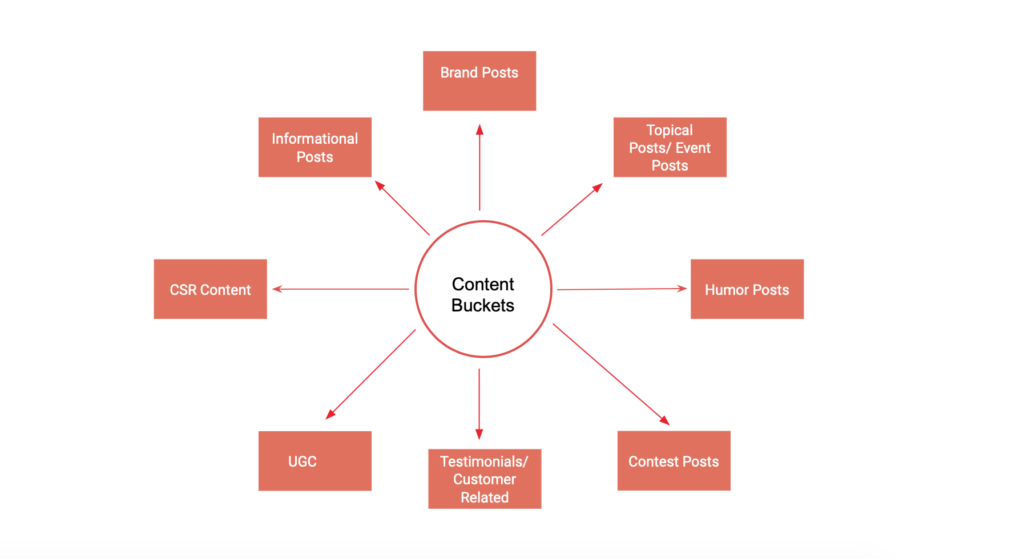
Everyone is familiar with the term social media and we are consuming content daily on different social media channels. Each individual is spending at least 30mins on social media channel every day and the content consuming is increasing day by day. Effective usage of social media can help you to connect with your audience and increase your business! So What is Social Media? Social Media is the usage of channels or websites or apps that allows users to create and share content on Social Channels. Few well known social media channels include: Facebook YouTube Twitter Instagram LinkedIn Facebook Facebook is one of the popular social media channels in the world, which allows users to create profiles, upload content and connect with friends and families. Facebook has got the highest active users compared to any other social media platform, it has 2.3 billion monthly active users YouTube YouTube is by Google, it’s a social media channel which allows users to upload videos, share videos and view videos. It is a free platform where you can create your own profile which is called as a YouTube channel and start uploading videos to showcase your work. People can also like, comment and share these videos on other social media sites. Youtube has around 1.9 billion monthly active users worldwide. Users can also earn from their youtube content basis the views they are generating on YouTube, this can be done by connecting your channels to a Google Adsense account. Twitter Twitter is a social media channel which is a free microblogging site, which allows users to post short message posts called tweets. Users can create free twitter account, which is called as twitter handle. They can then start following other handles/profiles and also start posting tweets on Twitter. You can also use hashtags and get them trending on Twitter Twitter has around 326 Million active users worldwide. Instagram Instagram is a social media platform which allows users to share photos and videos on the channel. It is a platform, now owned by Facebook. Instagram is all about visuals with different filters to add to your photos and videos. Instagram has become popular because of Insta Stories. Insta Stories is a feature on Instagram which allows users to share videos and photos in a form of a slideshow, these stories then can have different filters, you can tag users, checkin, add text on stories etc. Instagram has around 1 billion monthly active users worldwide. It is largely used with a mobile application and is very popular with millennials. LinkedIn LinkedIn is a social networking site which caters to professional networking. It helps you to connect with professionals across different industry verticals through a single platform. Users can create profiles and update their experience summary on their profiles. Employers can also hunt professionals through LinkedIn easily as it allows the usage of different filters within the platform to find relevant professionals basis job profile. LinkedIn has 630 Million monthly active users world wide. Most of the companies create their profiles on LinkedIn to keep their audience engaged, share their content related to business and industry news. Apart from these popular channels other popular social media channels include Snapchat, Whatsapp, Pinterest, WeChat, Tik Tok etc. So What is Social Media Marketing? Social Media Marketing is the usage of social media channels to reach out to your audience, create awareness about your business, engage with your audience and convert them into sales or leads. Social Media helps to connect with your audience effectively and engage with them, it also helps you to communicate your message effectively which can go viral on social media. But to make you content viral, the content has to be impactful and engaging. In today’s scenario, it is important for every business to be on Social Media, as the audience is highly active on social media and you can effectively connect with your audience by making a high impact. Advantages of Social Media Marketing Social Media Marketing is highly effective and it’s one of the key domains of Digital Marketing which will help you to connect with your audience and grow your business. Below are the advantages of Social Media Marketing Reach One of the important aspects of marketing is that you want to reach to your audience through different channels including online and offline. As the audience is high on social network basis the product you are marketing, you can reach out to your users with various targeting parameters including interest, behaviour, demographics etc. Awareness When a business is new or has launched a new product/service in the market, it is important for the brand to promote the same so that people know about it. Social Media helps to do that, it helps to create awareness within TG and engage with them with different forms of content including text and video. After reaching out to the users, Awareness is the first stage in the marketing funnel. Traffic Generation One of the key advantages of social media marketing is that, it helps you to generate traffic. When you are marketing your brand online, the first step is to build traffic. There are various channels to build traffic including search, display, email, seo etc. Social also helps you to build traffic by sharing content or promoting content on social networking sites. Engagement One of the key benefits of social media marketing is that it helps you to connect with your users and engage with them. Engagement could be any interaction including a like, comment or a share. If the users are engaged with your content, then will also act as brand advocates and promote your brand. Social Media is a powerful channel to increase the shareability quotient of brand content. Conversions Yes, social media marketing is also helping brands to generate leads and drive purchases on business websites. As users are highly active on social media, social media is considered as one of the effective channels to grow your business. Many brands have
Types Of Websites In Online Business
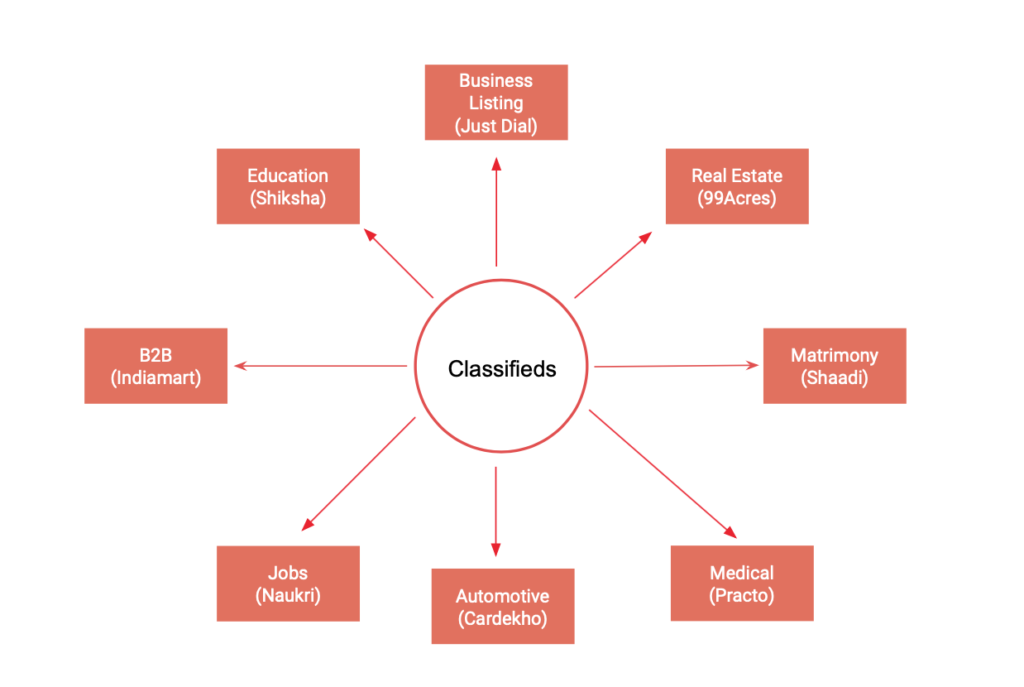
If you are new to Digital Marketing or Online Marketing, it is important for you to understand different types of websites in online business. Different types of online business have different types of revenue models. In today’s Digital Ecosystem, there are many websites which are available online, so let’s try to understand what are the different types of websites in online business with examples. Get Free Introductory Digital Marketing Course by Rahul Gadekar – Access Now Different Types of Websites in Online Business Includes: Horizontal Websites Vertical Websites Ecommerce Websites Classified Websites eTicketing Websites OTT Websites Affiliate Websites Marketplace Websites Review Websites Social Media Websites Personal Websites Company Websites So let’s understand each one of them 1. Horizontal Websites Horizontal websites are those websites which talk about different verticals including sports, health, food, sports etc. Basically they are a mix of different verticals, they don’t focus on one specific vertical like news websites Eg of horizontal websites includes Ndtv, TimesofIndia, Bhaskar, Jagran etc. Most of the news websites will fall under horizon websites type of online business 2. Vertical Websites Vertical websites are those websites which talk about a specific vertical or a category. They only focus on one category of content/business. Eg of Vertical Websites include SportsKeeda, Cricbuzz, Nisha Madulika etc 3. Ecommerce Websites Ecommerce websites are those websites from where you can shop products like apparel, furniture, footwear etc. Eg of Ecommerce Websites includes Amazon, Flipkart, Jabong, Myntra etc Ecommerce websites have different categories to shop from, they don’t focus on single category. Websites which have multiple categories to shop from are part of horizontal websites. 4. Classified Websites Classified websites are those websites which list different business. Classified websites are also one of the form forms of online business which has huge potential to grow. Eg: JustDial, Practo, Quikr, Olx etc Classified Websites are further divided basis different verticals as below 5. eTicketing Websites eTicketing websites are those websites from where you can buy tickets or book tickets for events, train, flights, movies, shows, etc. eTicketing websites are also one of the most popular online business websites which you will come across today as you can directly book tickets online without any hassle. Eg of eTicketing websites are MakeMyTrip, BookMyShow, Insider, IRCTC etc 6. OTT Websites OTT websites are often called as OTT Platforms. OTT stands for Over The Top, OTT term is used in online business which refers to content creators/publishers who stream content/media directly to viewers online with usually subscription models Eg of OTT platforms include Amazon Prime, Netflix, Hulu, Now Tv, Sling Tv etc OTT platforms are getting platforms are getting very popular as they offer video on demand service at the best cost. Also, you have a lot of options to choose from different genres. 7. Affiliate Websites Affiliate websites are types of online business websites who sell somebody else’s product/service and get a commission out of the sale. These websites are good to start if you have a strong understanding of development, as it’s about pulling different products from different websites and then selling them through different ways of Digital Marketing. Eg of affiliate websites are Trivago, Coupon Dunia, Coupon Raja etc If you are a freelancer and you want to earn money sitting at home, then affiliate marketing is one of the best ways to earn money from online. But to setup the website and to build the traffic is the primary stage, once you have traffic, then you will be able to make money. 8. Marketplace Websites Marketplace websites are type of online business websites where people can connect/collaborate and work together. Here the business creates the sites and allows users to connect with each other, the users can work on different projects or discuss their requirement with each other. The website charges a commission for the total value of the business. Eg of marketplace websites are Freelancer, People Per Hour, Upwork etc. 9. Review Websites Review websites are those websites where you can go and post reviews about products/services/business etc. There are limited review websites but have a huge potential to grow, as a lot of users do search for reviews and complaints before going for a product or a service. So here review websites have a major role to play in. These websites are websites where users can create an account and start posting reviews. It’s mostly user generated content, so you don’t have to regularly create content for such kind of websites. Eg of Review Websites are MouthShut, Yelp, G2 Crowd etc 10. Social Media Websites Social media websites are types of online business websites where you can connect with users and engaged with them. These websites are very popular with the audience as they can share, comment and like content created by their friends on social networks. These websites are also used by brands for their social media marketing strategy to reach out to their target audience and engage with them. Now these websites have move towards mobile applications which are the key assets for publishing content and engaging with your audience. Eg of social media websites are Facebook, Instagram, Pinterest etc 11. Personal Websites Personal websites are types of online websites which are for your own identity. You showcase your profile, your work/portfolio etc. These kinds of websites are usually for individual identities of actors, sportsman, photographers etc If you are a photographer or individual consultant or a celebrity, then you should have your own website where users can come and see your work. 12. Company Websites Company websites are types of online websites which are for business purpose to show what the company is into, what they do, what they offer, what’s their philosophy etc. Most of the companies have their website so that their customers can easily find them on Google. It important for every company to have their own website. These websites can then be marketed through Digital Marketing to grow your business. Conclusion Before starting any online business or understanding
Master Guide To Marketing Attribution Models To Grow Your Business
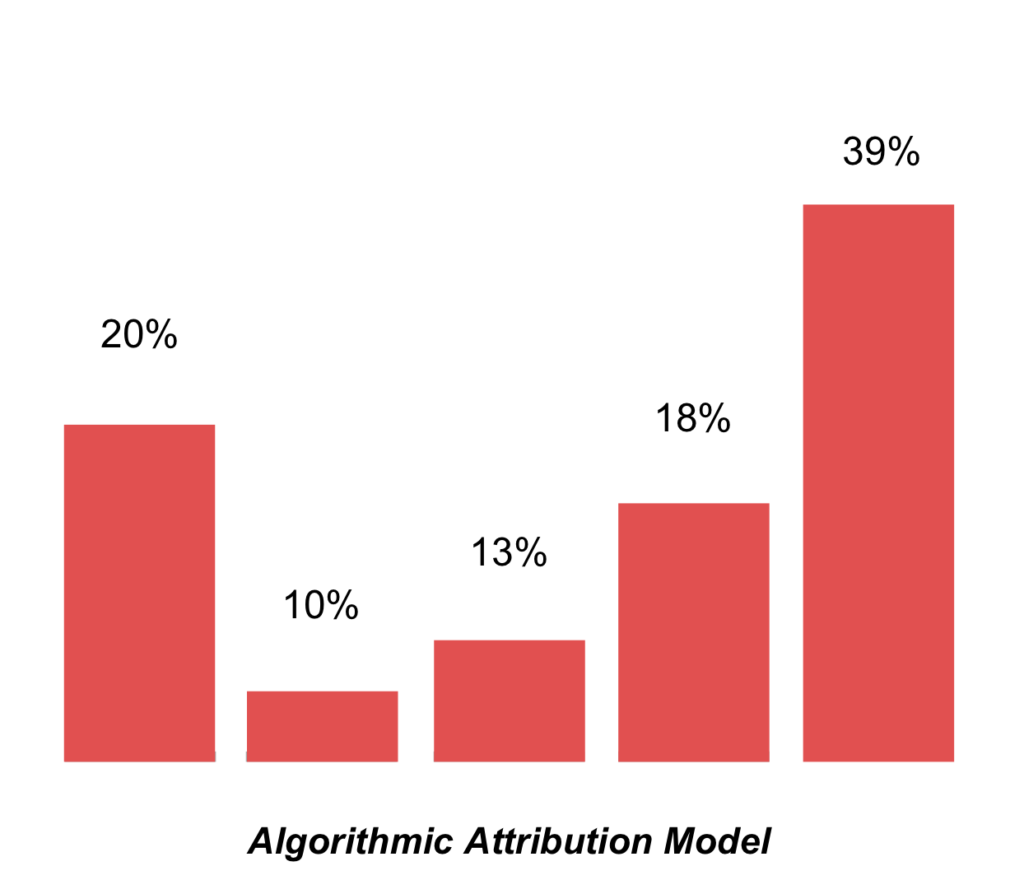
As a Digital Marketer, you would be using multiple channels to market your business including Google, Facebook, Email etc. It’s important for you to know which sources are performing and at what level during the customer journey. Marketing attribution helps you to understand the journey of customer touch points in detail, which further helps you to optimize marketing mix and drive more value from your marketing efforts. This article will guide you in understanding marketing attribution, the types of marketing attribution and which one to choose to grow your business! Let’s get started! So What is Marketing Attribution? Marketing Attribution is the process of identifying set of users action in the form of events or touch points which leads to a conversion or sale. In simple words, it’s the action taken by the user during the journey of a sale from seeing an ad to buying the product. Different Types of Marketing Attribution Models! First-Touch Attribution Model Last-Touch Attribution Model Linear (Even Weighted) Attribution Model Time-Decay Attribution Model U-Shaped or Position Based Attribution Model W-Shaped Attribution Model Algorithmic Attribution Model Let’s understand each one in details! 1. First-Touch Attribution Model First-Touch attribution model also known as the first click attribution model, which gives all credit to the first click/first touch, that leads a user to a website. This model is applicable to the users if they don’t fill up a form or subscribe or purchase on the website. This model helps you to understand the entry source of the customer on your website which is also driving value to your business. If you go first-touch attribution model, you actually don’t know which other touch points contributed to a conversion in the journey. So it’s not that helpful, to review the key factor which generated conversion. First-touch attribution model can be used when your objective is awareness and driving visitors to your website, in this case you want to know from where the users are entering your website. If you are looking to understand the conversion funnel, I won’t recommend going with first-touch attribution model 2. Last-Touch Attribution Model Last-touch attribution model is also known as last click attribution model. In this model the entire credit is given to the last click which generated a conversion or a sale. Most of the marketers go with his model because they want to know which keyword generated conversion or which website generated conversion or through which source the actual conversion happened. This model will completely focus on the last touch point. But you won’t understand which other touch points were part of the customer journey, because to you, they would also be equally important to understand and optimize them in the funnel. You should look for “Last Non-Direct Click” on Google Analytics to measure the effectiveness of the campaign, here it ignores the direct click 3. Linear (Even Weighted) Attribution Model A Linear attribution model gives equal credit to all the touch points in the customer journey. In this model we are able to understand all the touch points which actually generated conversion or sale, this helps us to further define our marketing strategy. The only challenge with this model is that we actually don’t know which touch point was the major contributor to the final action, who ideally should get the maximum credit. I would go with linear attribution model if my objective is to understand what all touch points are generating sales. Through this I know all customer touch points which are driving value to my business and I can further optimize them. 4. Time Decay Attribution Model Time decay attribution model gives maximum credit to the touch point which was closer to the point of conversion. It gives different values to each touch point from the point of interaction to the point of conversion with the last touch getting the maximum and the first touch getting the minimum, refer below. This model ignores what touchpoints actually directed a visitor to a website or business. It’s not a recommended attribution model. 5. U-Shaped or Position Based Attribution Model U-shaped attribution model is also called as position based attribution model. In this model, the first touch and the last touch is credited with 40% each as the value and the remaining 20% is divided between the other touch points. In this model, all the touch points get credit, whereas first and last touch points are considered as the key drivers for action, so they are credited with 40% each as the credit. The other touch points between first and last are also important touch points when we are looking at the consumer journey, so giving credit to first and last ignores the importance of other touch points, as they are equally important for the action to happen. Won’t recommend with going U-Shaped or Position based attribution model. 6. W-Shaped Attribution Model W-shaped attribution model is similar to U-shaped attribution model. But in W-shaped model, the credit is given to the touch point where a user is converted to a lead. This action takes place somewhere in the middle of the journey, hence it is known as W shaped attribution model. The remaining credit is divided between the other touch points other than first and last. The three touch points are credited with 30% value for each and the rest of 10% is credited to the remaining touch points. Won’t recommend this model as each and every touch point is getting a credit but the remaining one’s are credited with a lower value, ideally everyone should get equal value. 7. Algorithmic Attribution Model Algorithmic attribution model also known as custom attribution model is an attribution model where you can custom set the credit value for each touch point basis your understanding. I have defined credit value for each touch point as below, as I want to give a bit higher credit to the first touch point as it starts the consumer journey and then I have given low credit to rest

