
Master Guide To Reduce ACOS On Amazon Ads in 2025
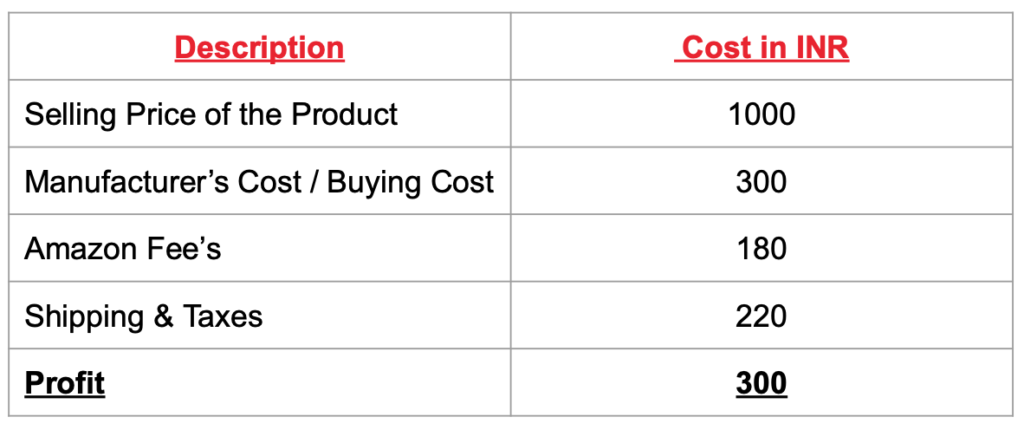
ACOS is one of the important metrics while measuring performance of your Amazon sponsored products ads campaign, product display ads campaign and sponsored brand ads campaign. Advertisers keep optimising their campaigns to lower the ACOS, which helps them to earn more profits on sales through Amazon ads. What is ACOS in Amazon Ads? ACOS stands for Advertising cost of sales, it is the percent of advertising cost on the sales. Here is the Amazon ACOS formula: Amazon ACOS Formula = Total Advertising Cost x 100 Total Sales What should the ideal ACOS for any product on Amazon be? An ideal ACOS which you should target on Amazon should be less than 30%. If your ACOS is going about 30%, then it’s a concern. How to determine ACOS for your product? In order to determine the right ACOS for your product, you can follow the following logic basis the selling price and your product cost So ACOS in this scenario will be If your ACOS is going beyond optimum ACOS, then you need to reduce your ACOS by optimizing couple of aspects in your campaign. How to reduce ACOS on Amazon Ads? In order to reduce ACOS you need to look at the below parameters 1. Keywords Make sure you have used relevant and high intent keywords for your campaign. For Eg: I am if you are selling weight loss supplement and you have targeted “weight loss keyword”, then it’s not a high intent keyword. You should use keywords like “weight loss supplements”, “weight loss supplements for men” etc. You need to make sure the keywords are relevant and have high intent of buying 2. Keywords Match Types Make sure you have used different types of keyword match types including phrase and exact. Try avoiding broad match types. If you use broad match type, you will participate in multiple irrelevant keyword searches which won’t drive sales To understand in detail about keyword match types and how to use them, refer article – Guide To Keyword Match Types 3. Use Negatives View the search term report on a regular basis and keep adding negative keywords to exclude showing ads on irrelevant searches. This will help you to reduce spends on irrelevant searches. 4. Manual Campaign Strategy Would recommend you to go with manual campaign strategy as it’s allows you to select the right keywords for your campaign, whereas in automatic campaign strategy, Amazon will trigger ads basis your product and product category matching the searches happening on Amazon. 5. Use Differential Bidding Strategy While running ads on Amazon, you will come across two bidding strategies including dynamic bids – down only and dynamic bids – up & down. Would recommend you to try different bidding strategy for non performing keywords with a lower CTR and conversion rates. Also, make sure you have defined an optimum CPC for your campaign. Default CPC can be calculated basis following approach Let’s consider the above example which has an ACOS of 30% and selling price of Rs. 1000. Now in order to understand the optimum CPC you should also know the conversion rate for your campaign. So I am considering 10% is the conversion rate for my campaign. So the default CPC will be calculated as below 6. CTR CTR defines the no of shoppers you send to your product detail page. You should minimum target a CTR of 6% on Amazon. If your CTR’s are low, the reason would be because of the search ranking. You can improve your search ranking by optimizing content on your product pages as described in the next point. 7. Conversion Rates Conversion rates is one of the important factors to be considered while improving your ACOS on Amazon. In order to improve conversion rate, you need to optimise your product detail page for the following aspects Product Titles – Define the product titles with the primary keyword for the product Product Description – Add a detailed description which explains in detail the product and the features of the product Product Screens with details – Product screen’s are an important part of the product page, as they help to tell the story about your product on the first section through visuals. As shoppers have multiple options on Amazon, it’s important to highlight the key aspects of the product on the screens in a form of a story Value Proposition of Your Product – Define the value proposition of your product which helps shoppers to consider your product than your competitors Trust Factors – Add trust factors including approved by FSSAI (for supplements), clinically proven and Certificates shared by authorised bodies Reviews – Make sure you have a strategy to define reviews on your page, as most of the shoppers will read the reviews before buying your product FAQ’s – Add FAQs which clearly answers different queries which shoppers would have related to your products Conclusion Optimising your ACOS on Amazon is very important as it also defines the profit you make through selling on Amazon. Keep optimising different aspects after every 14 days basis the no’s you observe on your Amazon campaigns and let me know how is the ACOS reducing on Amazon!
Guide To Amazon Sponsored Brand Ads
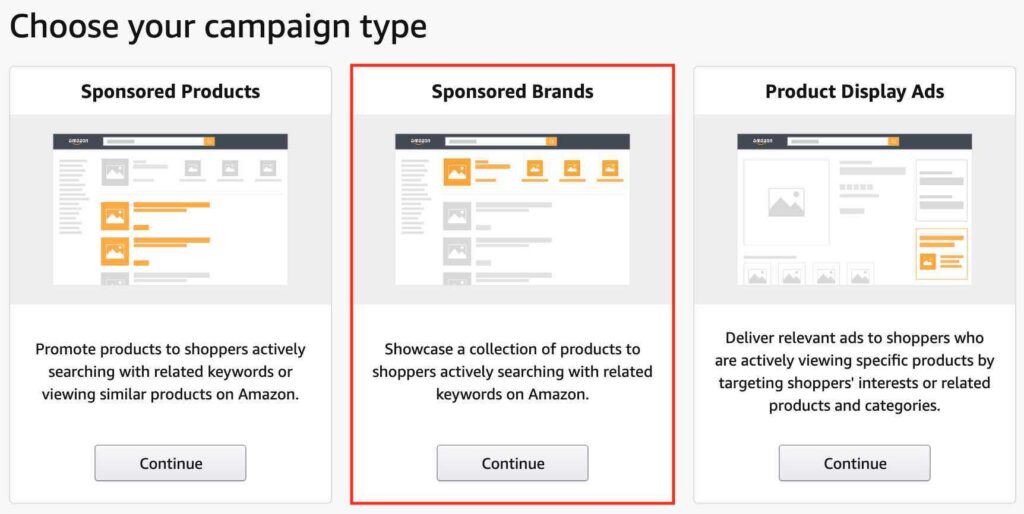
Amazon sponsored brand ads formerly known as headline search ads, helps your to build visibility of your products on Amazon and drive sales. So What are Amazon Sponsored Brand Ads? Amazon sponsored brand ads are ads which showcase a collection of products on top of Amazon search results to shoppers who are actively searching for products on Amazon. Where do Amazon Sponsored Brand Ads appear? Sponsored brand as appear on the top of the search result, with a collection of at least 3 product ads, refer the screen below What does Sponsored brand ad consists of? 3 Products / 3 ASIN’s Brand Logo Headline Brand Page (Shop Now Link) So How to create Amazon sponsored brand ads? Step 1 Login to your Amazon account – Amazon Ads Step 2 Select the campaign type as sponsored brands To know more about sponsored product ads, refer article – Ultimate Guide to Amazon Sponsored Product Ads To know more about product display ads, refer article – Step by step Guide to Amazon Product Display Ads Step 3 The next thing is to define campaign settings: The first thing in campaign settings is to define campaign name, you can define the campaign name basis the products (theme), which you want to run your brand ads for Portfolio – If you own multiple Amazon ad accounts, you can select the type of Amazon account from here. Start & End Date – Start & end date are the dates from where you can define the dates for your campaign Budget – Define a daily budget for your campaign, you can start with minimum of Rs. 500 as the daily budget. Landing page for ad traffic Landing page for ad traffic is where the shoppers are going to land after clicking on your ad. The landing pages can include product detail page, your Amazon store page a custom URL There are three options to choose from landing page for ad traffic as below: Amazon Store (including subpages) – With the help of this option you can increase brand awareness and product discoverability by sending shoppers to your Amazon store with collection of products under each category of your brand page. For Eg: You are a seller and have 3 categories of products including mens footwear, women footwear and kids footwear, you can select one single category and target 3 products in your brand ad. In my campaign, I can see the categories to select from my store as below So, let’s say I want to promote sports nutrition products under my sponsored brand ads campaign. Once I have selected sports nutrition, I can see the below screen which says creative. The first thing under creative is to define brand name and logo The next thing is to define headline, you can define the headline basis the benefits/features/USP’s of the product The next thing is to define products, you can see I have defined the products as below. Let’s now understand the second option under landing page for ad traffic, known as new product list page (Note: You can select at a time, any one of the landing page for ad traffic options, from the given 3 options) New Product List Page – New product list page allows you to create a page featuring 3 or more of your products to be shown on a product list page. You can search for the product in the search bar and add products. I have added 3 products from different categories as below. You can then review the page by clicking on the preview your product list page Once you have added the products, you will be able to see the below screen, where you can see the creative or ad copy of your Amazon brand ad, you can now define the headline and the order of the products here. The third option in the landing page for ad traffic is custom URL. As mentioned above, you can only select one option from the landing page for ad traffic Custom URL – Custom URL helps you to advertise any page on Amazon, which showcases minimum of your 3 brand’s products. Once you click on custom URL, you will be able to see the below screen. From here you can page the Amazon URL with the 3 products which you want to promote. So Which option to choose from landing page for ad traffic? My recommendation would be to go with the first two options which includes Amazon store (including subpages) or New product list page option. If your objective is to promote products within a specific category, go with Amazon store (including subpages option). If your objective is to promote different products in your store, go with new product list page. For my current campaign, I am going with Amazon store(including subpages), where I have selected sports nutrition as a sub category under my store (refer step 3, first option under landing page for ad traffic) Step 4 The next step is keywords targeting where you define the keywords for your campaign. The first step here is to define default keyword bid. The keyword bid is the maximum bid for all the keywords which you add in the campaign. You can also set a different keyword bid once you add the keywords in your campaign. Automated Bidding – Once you define the default keyword bid, you will observe an automated bidding option, which allows Amazon to automatically optimise bids for placements which are below top of search. Now you can start selecting keywords. There are three ways you can add/choose keywords to your campaign Suggested Keywords – Through this option Amazon suggests you different keywords which are relevant to your products (which you have defined above in step 3), you can then select these keywords by clicking on ad on the right hand side. Enter Keywords – The second option to add keywords is with enter keywords.With the help of enter keywords, you can choose around 1000 keywords to
A Step by Step Guide To Amazon Product Display Ads
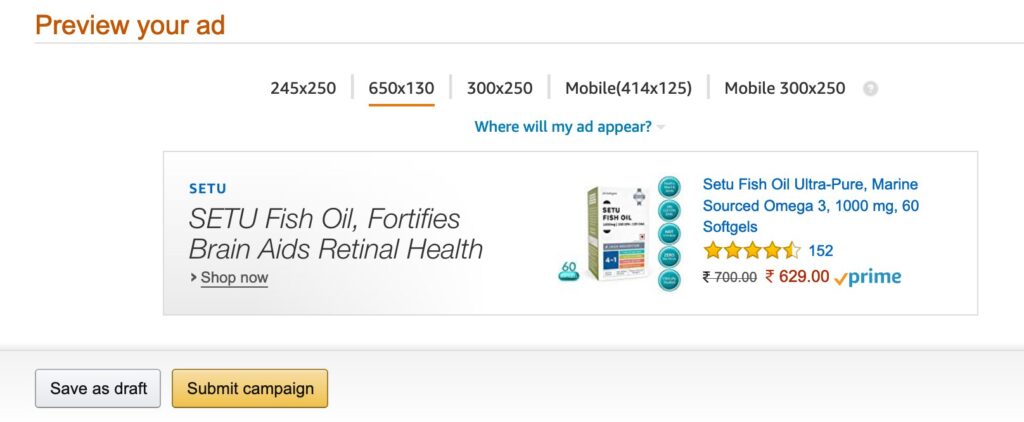
Amazon product display ads are very effective if you are looking to increase visibility of your products and push your product in front of shoppers when they are looking for competitors product. So What are Amazon Product Display Ads? Amazon sponsored display ads are display ads which show on product pages basis their interest or similar products while browsing on Amazon. Where Do Amazon Product Display Ads appear? Sponsored display ads appear on the right hand side of the product detail page, refer below screen. There are two ads on the page, one by amfit nutrition and second by omega 3. Both these ads are called as product display ads So What are the advantages of product display ads? Increases Visibility Product display ads helps you to build visibility on competition product pages and similar product pages. If you are a new brand or if you have launched a new product, product display ads should be considered. Drives more traffic to product page As you are visible on multiple product pages, they impressions served for your ads are higher, hence you will be able to drive more traffic from product display ads Targets competitors product pages This is one of the most interesting parts of product display ads, as it allows you to target competitors pages. This increases visibility of your products, to shoppers who are considering competitors products. Drives sales As the visibility is high on similar and related product pages, the traffic generated is high through product display, which further leads to drive more sales on Amazon. How to create Amazon Product Display Ads? Let’s understand step by step, how to set up Amazon sponsored display ads? Step 1 Login in to your Amazon account – Amazon Ads Step 2 Select the campaign type as product display ads To know more about sponsored product ads, refer article – Ultimate Guide to Amazon Sponsored Product Ads To know more about sponsored brands ads, refer article – Guide To Amazon Sponsored Brands Ads Step 3 Select the targeting method. There are two types of targeting methods: Product With the help of product targeting, you can target competition product pages, similar product pages and related product pages. Interest With the help of interest targeting, you can target shoppers basis their shopping behaviour on Amazon Selecting of targeting will depend on your objective of the campaign. If you have launched a new product and want to increase the reach of the product then you can go with interest based targeting. If you objective is not to be very broad in targeting, then you can go with product targeting. In this article I am taking an example of a product called a Fish Oil to create a campaign. The next thing is to select the product (the product which you want to create product display ad for), so I have selected the product as below Now, you need to add the products, on which you want to show your ads, these products can be your competitor products or similar products on Amazon. In order to add products for targeting, search in the search box as below, and start selecting the products which you want to target ads on. I have selected a few products as below. After you have selected product targets, at the bottom, you will see an option which says expand targeting to other closely related products. You can keep this option as tick, because Amazon will try to show your ads on product pages which are similar to your product, though you have not selected them under product targets. Let’s now understand interest targeting. Always remember you can select only one targeting method which is either product targeting or interest targeting. First thing under interest targeting is to select the product which you want to use as an ad for product display. So I have selected the product as below, which is going to be my product display ad for my campaign. Once you have selected your product, the next thing is to select interest targeting for your campaign. Below are the options to choose from, under interest targeting. Electronics Gift Cards Crocery Health and Personal Care Home & Kitchen Music Musical Instruments Office Products Pet Supplies Sports Toys and Games Video Games Watches Under each interest, there are sub interests, you can select the interest target as per the product you are marketing. I have selected all health & personal care as interest targeting as below. As mentioned, interest targeting is very broad and will have a broader reach on Amazon, so would recommend you to go with product targeting for your product display ad campaign. Step 4 Once you have selected your targeting (either product or interest), the next step is to define campaign settings. Under campaign setting you need to define Campaign Name – It’s the name of your campaign, which can be defined basis the product you are marketing on product display ads Cost Per Click Bid – It’s the maximum cost per click for this campaign. Amazon suggests you a bid range, you can select a cpc basis the range Budget – It’s the budget you want to spend per day for this campaign. Minimum per day budget should be Rs. 1000. Duration – You can define start date and end date for your campaign through this option I have defined the campaign settings as below. Step 5 The next step is to define an ad copy. The components of an ad copy includes: Headline – It defines the headline of the ad copy. The maximum characters allowed in headline are 50 Brand Name – Define brand name of the product. Product Description – It’s the description of your product. Try to add maximum information about your product in the description which highlights different aspects of the product. Brand Logo – Define the logo of your brand Below is how I have defined the ad copy Once you have added all the information in the ad
Ultimate Guide To Amazon Advertising in 2022
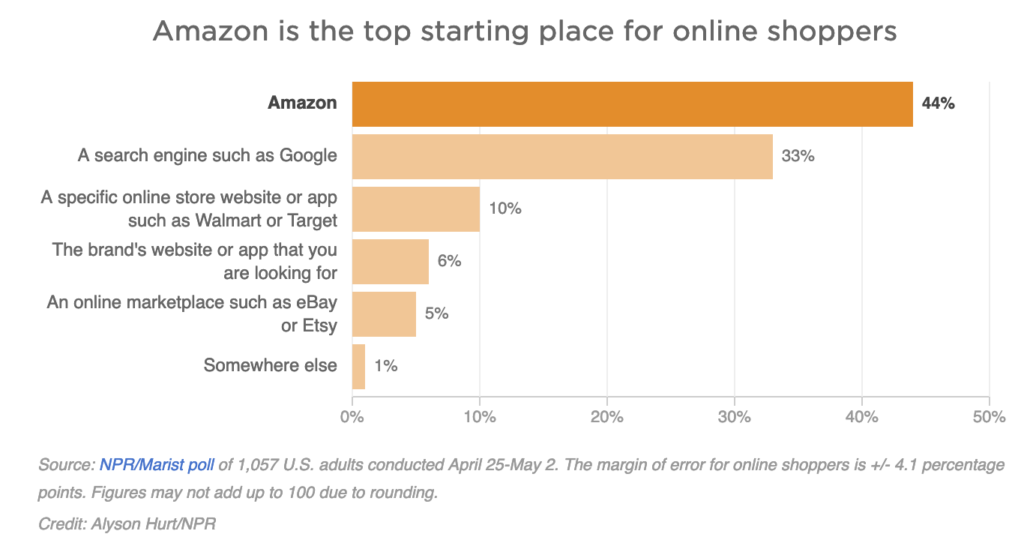
Amazon has become one of the key channels for retailers to drive sales as the users on Amazon are actively looking for products to buy, so the buying intent is very high on Amazon. Below chart explains how Amazon is moving above Google as the first touch point for product discovery. Understanding this demand, Amazon created an advertising platform called as Amazon Marketing Services commonly known as AMS, so that sellers/retailers can start advertising on Amazon to increase visibility and drive sales. This article will guide you on Amazon advertising fundamentals and how to create Amazon sponsored product ads. So let’s get started! So What is Amazon Advertising? Amazon advertising is a method to advertise on Amazon store through Amazon’s platform called as Amazon marketing services, with different type of ad formats, including sponsored product ads, product display ads and sponsored brand ads to drive product sales on Amazon. So how to start with Amazon Advertising? In order to start with Amazon advertising, you need to have either of the below Amazon accounts Seller Central Account – This is an account if you are a retailer and selling multiple products of different brand If you don’t have a seller central account, you can create it from here – Amazon Seller Central Account Brand Account – This is a brand account which a brand would create If you don’t have a brand account, you can create it from here – Amazon Brand Account Once you have either of the above accounts, you can register for Amazon advertising from here – Amazon Advertising What are the different types of ads on Amazon? There are 3 types of ads on Amazon: Sponsored Product Ads Sponsored Brand Ads Product Display Ads Sponsored Product Ads Sponsored product ads are ads which trigger on Amazon search when users search for a particular product/keyword. These ads are viewed on Amazon in a form of listing. Sponsored product ads are very effective as they trigger on targeted searches related to your products. They also have higher conversion rates compared to other types of Amazon ads. Here is an example of a sponsored product ad Sponsored Brand Ads Sponsored Brand Ads trigger with a collection of products to users searching on Amazon for a specific keyword. Sponsored brand ads usually appear above all the search results on Amazon. They are very useful, if you are looking to showcase multiple products within a product category. Below is an example of sponsored brand ads Product Display Ads Product display ads are display ads which trigger on product pages by targeting users interests or related product and categories. Product display ads are usually to target competitor product pages. Here is an example of product display ad. In this article we are going to understand how to create Sponsored Product Ads, so before we start, let’s understand few requirements to fullifull, in order to start with sponsored product ads on Amazon. Account Requirements: The account has an active payment method You are a professional seller of a vendor on Amazon You are eligible to ship in the country you are advertising in Product Requirements: Products which do not comply with Amazon policies are not eligible to advertise Incorrect information on the product listing page is not allowed Adult products, used products or refurbished products are not allowed Sponsored products are available for the following search categories on Amazon only What are the Sponsored Product Ad Campaigns Limits in Amazon? So how to create Amazon Sponsored Product Ads campaign? Let’s understand the campaign creation for sponsored product ads step by step Step 1 Login to your account – Amazon Advertising Step 2 Now say create campaign by clicking on the orange button. Once you click, you will see the below screen Now select sponsored products option. To know more about sponsored brands ads, refer article – Guide to Amazon Sponsored Brands Ads To know more about product display ads, refer article – Guide to Amazon Product Display Ads Step 3 Once you select sponsored products option, you will see the below screen. Let’s understand each one of them. Campaign Name – Campaign name is the name of the campaign which you would use to identify the product which you are marketing through Amazon Ads. This is similar to the campaign name which we use in Google Ads Portfolio – If you have multiple Amazon accounts, then you can select the account type for which you want to run ads. Start & End Date – Start & end date are the dates for your campaign. You can define these days as per your requirement. Daily Budget – Daily budget is the budget which you would like to spend daily for this campaign. Targeting There are two types of targeting: Automatic Targeting Manual Targeting Automatic Targeting – With the help of automatic targeting, Amazon will match your ad with keywords and products which are similar to the product in your ad copy. For Eg: If your ad has a weight loss supplement product, Amazon will match relevant searches happening on Amazon similar to weight loss supplements, and then trigger your ad in the search results. Automatic targeting helps you to target multiple searches within a click, the visibility of your ad increases with automatic targeting. I would recommend if you have limited budget don’t go with Automatic targeting, as your ad will participate in multiple searches which sometimes might not be directly relevant to your product. Manual Targeting – With the help of manual targeting, you can choose specific keywords which are related to your product and target them. You can also use different keyword match types including exact, phrase and broad to define your keyword strategy. I would recommend, always go with manual targeting, because you know which keywords are going to show your ads, so there is less wastage of budget, and highly focused targeting to drive sales. Step 4 The next step is to define the products. Products nothing but the products which you
Master Guide To Facebook Dynamic Creative in 2025
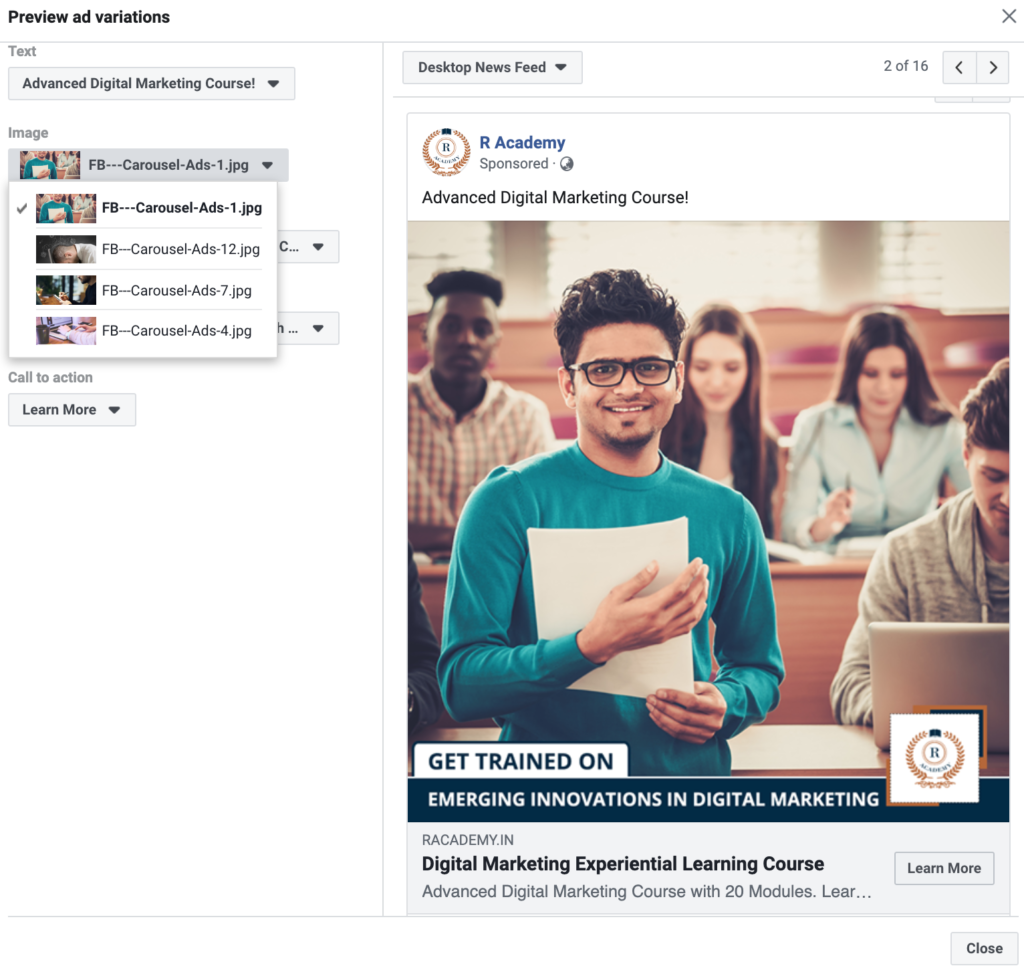
As we know Facebook is one of the most effective social media advertising platforms and advertisers try different ad creatives on Facebook to connect with their audience to drive higher ROI. If you are advertising on Facebook regularly, you would have noticed that the ad creatives perform in the beginning, when you start the campaign, but the performance decreases over a period of time. In order to make advertisers life easy, Facebook came up with Dynamic Creative to drive more value from the ad campaigns and the budgets invested on Facebook. In this article we will understand What is Dynamic Creative and How to setup Dynamic Creative campaign on Facebook. So let’s get started! What is Dynamic Creative? Dynamic creative is an automation of delivering display ads through technology in real-time that ads personalisation, scale & high ROI. Dynamic creatives are largely used in display ads with the help of programmatic advertising, by adding different variables to the creatives including live streaming data, sequential messaging, personalised remarketing and feed based customized marketing. Dynamic creatives are also known by Dynamic Creative Optimization (DCO) in display advertising. To know more about DCO for display ads, refer article – Dynamic Creative Optimization Let’s now understand about Facebook dynamic creative! What is Facebook Dynamic Creative? Facebook Dynamic Creative is an automation of delivering high performing ad to targeted audience, basis different creative templates. When you are marketing on Facebook, you don’t know which creative will work, which ad copy would be engaging, which headline would be impactful and which CTA would work. So Facebook Dynamic Creative allows you to upload multiple creatives, multiple videos, multiple titles, multiple descriptions and multiple CTA’s to a particular ad campaign. How does Facebook Dynamic Creative work? Once you have added multiple creatives, multiple descriptions, multiple CTA’s, multiple body text and multiple titles, Facebook monitors the high performing ad and delivers the high-performing ad with various combinations. Aspects you can test with Facebook Dynamic Creative? With Dynamic Creative, you can test the below aspects on Facebook 10 different images or videos 5 title text variations 5 body text variations 5 description variations and 5 call to action variations So How to create Facebook Dynamic Creative ad? Let’s understand step by step in detail, how to create Facebook dynamic creative ad. Step 1 Login to your Facebook business manager, select the ad account and then select the ads manager from business settings Step 2 Once you have selected ads manager, you will reach on the below screen. Here we need to select the objective of the campaign. I have discussed about each objective in the article Guide to create Facebook ads to grow your business, so you can refer this article to understand in detail. For this article, I am going to create a campaign for my Digital Marketing Course, where my objective would be to drive traffic to the website. So I am selecting traffic as my objective, you can select the objective basis your requirement. Step 3 The next step is to define the campaign name, so I am defining the campaign name as below, you can define the campaign name as per the product/service you are marketing. You can skip create split test and campaign budget optimisation. Step 4 The next step is to define ad set name, I am defining as below as I want to target users who are between 18 to 24 yrs Step 5 The next thing is to select the channel to which you would like to drive traffic to. So I am selecting website, as I want to drive users to my website. Step 6 This is an important step, which helps you enable the dynamic creative option. Here you need to turn on the dynamic creative button which is on the right hand side. Once you turn on the button, you will see the below screen which says, you can upload individual assets, including images & headlines, and generates combinations automatically with the help of Facebook’s dynamic creative algorithm. So say continue and move ahead. Once you have clicked on continue, you will see the below screen with the button on. Step 7: Next step is audience, here you define audience lists which is your remarketing list for your remarketing campaign. As I am not creating a remarketing campaign, I am skipping this step. To know more about Facebook remarketing and how to create it, refer article – Guide to Facebook Remarketing Ads Step 8: Next step is to define location, age and gender for your campaign. I have selected as below, you can select basis your requirement. Step 9: Next thing is to define detailed targeting for your campaign. I have discussed about detailed targeting for Facebook in article, Guide to Facebook ads, do through the same to understand in detail about Facebook targeting. So I have defined detailed targeting for my Facebook dynamic creative campaign as below. You can also define basis your target audience. Step 10 The next step is to narrow down your targeting. This helps you to precisely target selected audience only, which means that, the targeting which you have selected in detailed targeting plus, if the narrow targeting also matches, then your ad is eligible to trigger. Here is a representation of how the targeting will work. So, I have further added marketing as an interest in the narrow targeting. So my ad will be shown if the targeting matches as below. Step 11 The next step is to exclude users from targeting. I have added Digital marketing strategist because I want to exclude those users who are already Digital Marketers, and only target users who want to learn Digital Marketing. You can then save this audience, so that you can use the same in the future of any of your campaigns. Step 12: The next thing in the campaign settings is connections, where you can add a connection type for Facebook pages, apps and events. Under each connection type, you have multiple
Guide To Twitter Terminology
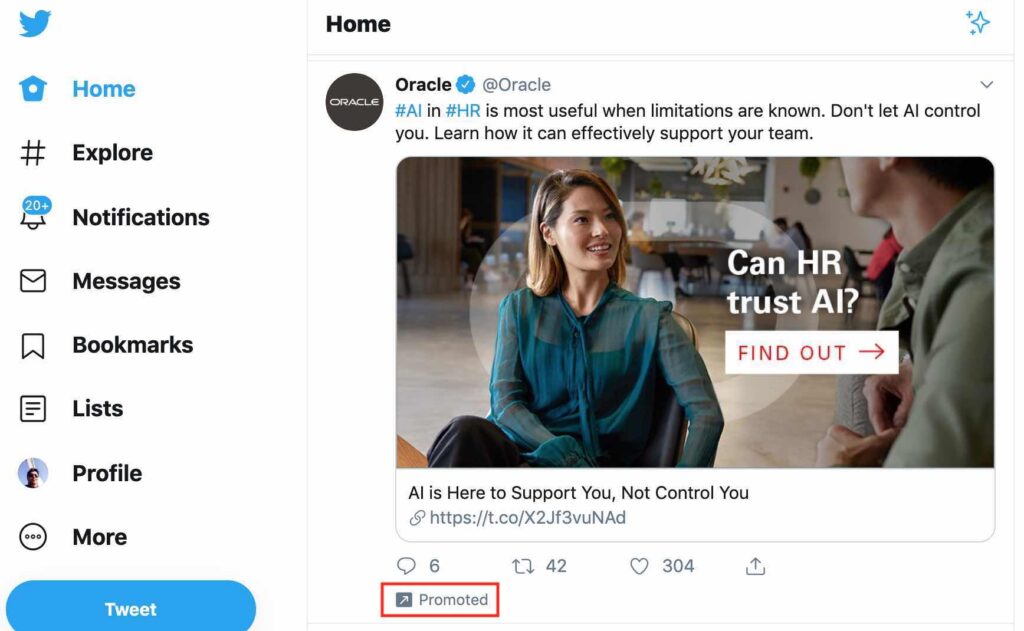
Twitter is one of the most effective social media platforms today, if you are starting with Twitter, it is important for you to understand different terminology and jargons used on Twitter. So let’s understand each one of them! 1. What is Twitter Handle? Twitter handle is the username of the account, when you create a Twitter account, you can define your username. For Eg: my personal account username is @raulgadekar and the Twitter handle link is https://twitter.com/raulgadekar. The username has @ before it and is often called as Twitter handle. You can also define your username with your name but you need to make sure that it’s not taken and it is 15 character of less. 2. What is Mention? Mention is tagging users in your Tweets or comments on Twitter. If you want to tag someone in a particular tweet, you need to mention their username For Eg: @username and type in the content and tweet it, they will receive a notification. Mention can be used to build conversations with your audience on Twitter. 3. What is a Hashtag? Hashtag is used with a # symbol before a word or combination of words, it is used to refer that the tweets are related to a specific topic. Hashtag creates database search on Twitter, which helps you to find conversations related to a specific topic. Hashtags are used by brand to build conversations about a specific topic, where users can participate and start interacting with the brand. Eg: Of popular hashtag campaigns, #ShareaCoke by Coca Cola, #WantAnR8 by Audi, #MyCalvins by Calvin Kleins If you are using hashtag for a particular campaign, you can get the hashtag trending and reach out to the audience on Twitter. 4. What is Retweet? Retweet also called as RT, is sharing a tweet or reposting a tweet. A person might retweet somebody else’s tweet because the content was valuable or interesting to share. Retweeting helps to spread message on Twitter. Brands encourage users to retweet, by using a particular hashtag and participate in a contest, which also helps to increase conversations on Twitter. 5. How to Retweet? Go to a particular tweet and click on the retweet button, refer screenshot below 6. What are Followers on Twitter? Followers are users who are following your handle. How to Follow a handle on Twitter? Go to a specific handle and click on the follow button, refer below screenshot. 7. What is feed on Twitter? Feed is a list of tweets whom you follow on Twitter. The feed is updated basis Twitter’s algorithm basis different signals including recency, engagement, rich media, location, no of followers etc It is also called as Twitter news feed 8. What is DM on Twitter? DM is a direct message. You can send a message directly to your followers message box on Twitter. In order to send the message, it is important that the recipient follows you, only then you can send a direct message to a user on Twitter. This message is a private message and only two Twitter users can view this. 9. What are Twitter Lists? Twitter lists are lists of users tweets which you don’t want to miss on Twitter. For Eg: If am following Cristiano Ronaldo and I don’t want to miss his tweets, I can add them in Twitter lists and can view all his tweets. Twitter lists can be created for multiple handles! So how to create Twitter Lists? In order to create Twitter lists, click on the list option on the left hand side and then say create a list. Once you click on the create a list option, you will see the below screen, where you can define the list name and add a description about the list. I have defined list name as programmatic because I want to view tweets from specific handles which talk about programmatic advertising. You can keep the list private or keep it public, I have kept it private because I only want to view it. Next is to add handles, to the list, I have added one handle, you can add multiple handles to the list. Once you have added, multiple handles, say done, post that you will see that the list has been created, refer below screenshot. Now whenever you want to view those handle tweets, just click on the list and you will be able to see all the tweets related to those handles. 10. What are Twitter ads? Twitter ads are ads on Twitter which includes promoted tweet, trending topic/trending hashtag and promoted account. Twitter ads are run through Twitter’s advertising platform. These ads are targeting through different targeting methods including behaviour, interest, conversation topics, keywords etc. To know more about Twitter ads – Refer article Guide to Twitter Advertising 11. What is Trending Hashtag or Trending Topic? Trending hashtags or trending topics are very important aspect of Twitter channel. Trending hashtag or trending topic, allows you to understand what is trending today in terms of hashtag or a topic. These trends are defined basis the no of people talking about the topic or hashtag. Where to view Trending hashtag or trending topic on Twitter? Trends can be viewed on the right hand side of your screen, you can also view the trends at the city level by clicking on the gear icon on the right hand side. 12. What are promoted Tweets? Promoted tweets are tweets which are promoted on Twitter with the help of paid advertising. Below is an example of promoted Tweet.
Master Guide To Twitter Advertising in 2022
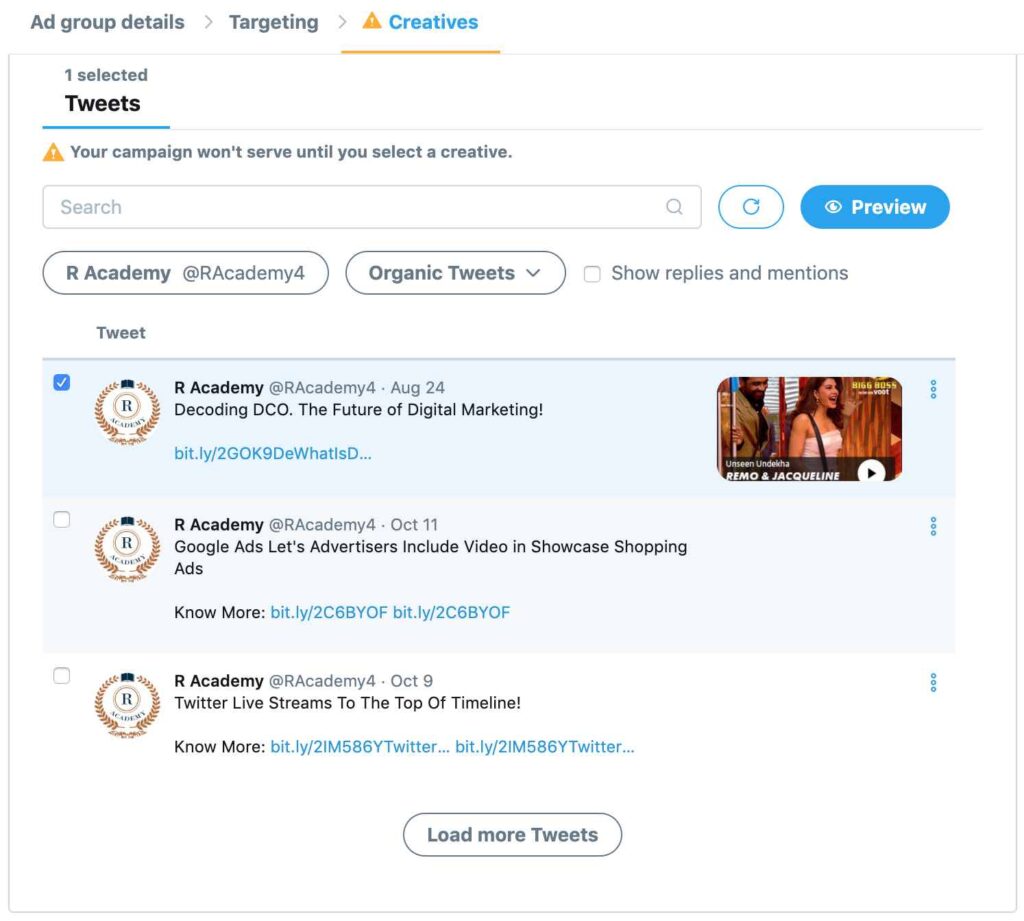
Twitter is one of the effective advertising social media platform after Facebook & Instagram. Though brands prefer Facebook & Instagram as their first choice for advertising, Twitter can’t be ignored, as Twitter advertising generates higher engagement. With a combination of hashtag while advertising, you can reach a wider audience on Twitter and also create conversations about your brand. In this article, we will understand how to get started with Twitter ads, Types of Twitter Ads and How to Create them. Before we start, let’s understand the advantages of Twitter ads So what are the Advantages of Twitter Advertising ? Higher Ad Engagement According to Twitter’s data, Twitter ad engagements have increased by 50% YOY, which means users are highly engaged on Twitter with ads. Low Cost-Per-Engagement According to Twitter’s data, Twitter has seen a decline by 14% YOY in cost-per-engagement, which gives more reasons to advertise on Twitter High Purchase Intent According to Twitter, 41% of users purchase a product within 30 days of the ad being viewed. Different Types of Twitter Ads Promotion? Promoted Trends or Promoted Hashtag Promoted Trends or Promoted Hashtag is very effective if you are looking to reach out to a wider audience with a specific message. Hashtags has the potential to communicate with the users effectively and build conversations. This promotion type can be used when you are launching a new product, want to communicate a specific message during festivals or events, launching a new brand etc. This promotion types is easily visible on the right hand side of your screen on desktop And on mobile app, it’s under search option, which is the first hashtag which is trending. As the promoted hashtag is given priority in the trends, the visibility is high, thus the engagement. Promoted Tweet The next Twitter ad promotion ad type is promoted Tweet. Promoted tweet usually appears in your news feed or Twitter timeline as below This tweet can be a video tweet, GIF tweet or image tweet. When users use Twitter, they usually keep scrolling their news feed, which gives brands an advantage to place a promoted tweet in between the news feed. Promoted Tweet is very effective, if you are looking to increase engagements on your ad content. Through promoted tweets, you can also drive users to your website, eventually helping you to generate conversions. Promoted Account Next promotion type in Twitter ads is promoted account. Promoted account is an account type when you want to promote your handle to gain more followers. If you are new on Twitter or you want to reach out to more users to encourage them to follow you, in that case you can go with promoted account. Below is how promoted account looks like on Twitter So How To Start With Twitter Advertising? In order to start with Twitter advertising, you first need a Twitter account, without a Twitter account, you won’t be able to advertise on Twitter. To sign in to your twitter account, click here Now once you are on your twitter account, click on the more option on the left hand side of your dashboard, refer below screen Once you click on more options, you will see a couple of options, from here you need to select Twitter ads. Note: If your Twitter account is less than 30 days old, you might not be able to access the option Once you click on Twitter ads, you will be able to see the below screen. That’s it, now you are ready to start advertising through Twitter! So How To Create Twitter Ads? Let’s understand in detail, step by step how to create twitter ad! Step 1 The first thing is to create a campaign. Once the top right hand side, you will see create campaign, so click on create campaign. Step 2 Once you click on create campaign, the next thing is to define campaign objective. There are different types of campaign objectives including Tweet Engagements Promoted Video Views Awareness Website Clicks & Conversions In-stream Video Views (pre-roll) Followers App Installs App re-engagements Let’s understand each objective in detail Tweet Engagements Tweet engagements objective type can be used when you want your audience to interact with your tweet content. If you are advertising a communication based campaign which has a specific message, you should go with tweet engagements. Promoted Video Views The next type of objective is promoted video views. Promoted video views objective type can be used if you are looking to advertise video content or GIF content on Twitter. It’s basically pushing your video content on Twitter channel. The key objective is to drive video views for your video content and also communicate the video message. The video content has to be impactful in order to create buzz. Awareness The next objective type is Awareness. Awareness objective type can be used when you are looking to reach out to maximum users on Twitter and create awareness about your product or service. If you are launching a new product or if your business in new in the market or you have a festive campaign, in that case you can go with awareness as an objective. Website Clicks or Conversions Website clicks or conversions objective can be used, if you are looking to drive users from Twitter on your site or if you are looking to drive sales from Twitter. In order to measure the sales happening through Twitter ads, you need to setup Twitter conversion tracking. The code is available in this objective type itself once you start creating the ads. This objective type is effective for driving traffic and increasing product sales on sites. In-Stream Video Views (pre-roll) In-stream video views campaign type can be used if you are looking to advertise your video ads before the video content starts which is available on Twitter. Twitter also says, if you want to advertise on premium video content, you can go with in-stream ads! In-stream video ads are very effective because they play before the video content
सोशल मीडिया मार्केटिंगचा वापर करून आपला व्यवसाय कसा वाढवायचा | Social Media Marketing in Marathi

आजकाल सगळेच सोशल मीडियाबद्दल जाणतात आणि आपण सोशल मीडिया चॅनल्सवरून खूप माहिती मिळवू शकतो. प्रत्येक व्यक्ती दिवसातून कमीत कमी ३० मिनिटे सोशल मीडिया चॅनल्सवर व्यतीत करते आणि दिवसेंदिवस हे प्रमाण वाढत जात आहे. सोशल मीडियाचा प्रभावाशाली वापर करून तुम्ही तुमच्या व्यवसायात प्रगती करू शकता. तर काय आहे हे सोशल मीडिया? (Social Media in Marathi) चला जाणून घेऊया! चॅनल्स, वेबसाईट किंवा अॅपवर सोशल मीडिया चालवले जातात. जिथे युजर्स कन्टेन्ट तयार करून सोशल मीडिया चॅनल्सवर शेअर करू शकतात. खाली काही लोकप्रिय सोशल मीडिया चॅनल्सची उदाहरणे दिली आहेत: फेसबुक यूट्यूब ट्विटर इन्स्टाग्राम लिंक्डइन फेसबुक संपूर्ण जगात फेसबुक खूप लोकप्रिय आहे, इथे युजर्स त्यांचे प्रोफाईल बनवून माहिती शेअर करू शकतात, त्याचबरोबर त्यांचे मित्र आणि कुटुंबियांसोबत जोडलेले ते राहू शकतात. दुसऱ्या इतर कुठल्या सोशल मीडिया प्लॅटफॉर्मच्या तुलनेत फेसबुकवर सर्वात जास्त युजर्स अॅक्टीव्ह असतात, इथे एका महिन्यात तब्बल २३ कोटी युजर्स अॅक्टीव्ह असतात. यूट्यूब गूगलने सादर केलेल्या या सोशल मीडिया चॅनलवर युजर्स व्हिडिओ अपलोड करू शकतात, शेअर करू शकतात किंवा बघू शकतात. यु ट्युब चॅनल या मोफत प्लॅटफॉर्मवर तुम्ही प्रोफाईल बनवू शकता. या चॅनलवर तुम्ही तुमचे व्हिडिओ अपलोड करून सर्वांना दाखवू शकता. प्रेक्षकांना जर तुमचा व्हिडिओ आवडला तर त्याच्यावर ते कॉमेंटस करू शकतात आणि त्याचसोबत तुमचा व्हिडिओ सोशल मीडिया साईट्स वर शेअर करू शकतात. जगभरात यु ट्युब वर एका महिन्यात जवळपास १९ कोटी अॅक्टीव्ह युजर्स असतात. यु ट्युबवर टाकलेल्या माहितीला मिळालेल्या व्हिव्ह्जवरून युजर्स पैसेपण कमवू शकतात. यासाठी तुमचे चॅनल गूगल अॅडसेन्स अकौंटशी जोडणे आवश्यक आहे. ट्विटर ट्विटर ही एक मोफत मायक्रो ब्लॉगिंगसाईट आहे, जिथे युजर्स त्यांच्या छोट्या संदेशांची पोस्ट टाकू शकतात, ज्याला ट्विटस म्हणतात. युजर्स त्यांचे ट्विटर अकौंट मोफत उघडू शकतात ज्याला ट्विटर हँडल म्हटलं जातं. हे हँडल बनवून झाल्यावर युजर्स इतर हँडल्स किंवा प्रोफाईलना फॉलो करू शकतात आणि त्याचबरोबर ट्विटरवर ट्वीट करू शकतात. तुम्ही इथे हॅशटॅगचा वापर करून तुमची पोस्ट ट्विटरवर लोकप्रिय करू शकता. जगभरात ट्विटरचे अंदाजे ३२.६ कोटी अॅक्टीव्ह यूजर्स आहेत. इन्स्टाग्राम इन्स्टाग्राम हा एक असा सोशल मीडिया प्लॅटफॉर्म आहे जिथे युजर्स त्यांचे फोटोज और व्हिडिओ शेअर करु शकतात. आता याची मालकी फेसबुककडे आहे. इन्स्टाग्राममध्ये विजुअल्स असतात जिथे तुम्ही तुमचे फोटो आणि व्हिडिओना वेगवेगळे फिल्टर्स लावू शकता. इन्स्टाग्राममध्ये उपलब्ध असलेल्या इन्स्टा स्टोरी मुळे इन्स्टाग्राम लोकप्रिय झाले आहे. इन्स्टाग्रामवर इन्स्टा स्टोरी ही एक अशी विशेष गोष्ट आहे जिथे युजर्स त्यांचे व्हिडिओ आणि फोटो स्लाईड शोच्या रूपात शेअर करु शकतात. युजर्स त्यांच्या स्टोरीमध्ये वेगवेगळे फिल्टर्स, टॅग, चेक इन आणि टेक्स्ट इत्यादींचा वापर करू शकतात. एका महिन्यात इन्स्टाग्रामचे तब्बल १ बिलियन यूजर्स संपूर्ण जगात अॅक्टीव्ह असतात. याचा वापर जास्त करून मोबाईल अॅप्लीकेशन वर केला जातो आणि आजच्या जमान्यातील तरुणांमध्ये हे फारच लोकप्रिय झाले आहे. लिंक्डइन लिन्कडइन हे एक सोशल नेटवर्किंग साईट आहे जे व्यावसायिक नेटवर्किंगचे रूप आहे. तुम्ही वेगवेगळ्या उद्योगामध्ये काम करणाऱ्या व्यावसायिक लोकांसोबत या एकाच प्लॅटफॉर्मवरून एकमेकांशी जोडले जाऊ शकता. युजर्स त्यांचे प्रोफाईल बनवून त्यांच्या अनुभवाचा सारांश अपडेट करू शकतात. वेगवेगळ्या व्यावसायिक लोकांना लिन्कडइन मार्फत वेगवेगळे फिल्टर्स लावून त्यांना उपयोगी होतील अशा व्यावसायिकांच्या जॉब प्रोफाईलला सोप्या रीतीने शोधू शकतात. जगभरात लिन्कडइनचे एका महिन्यात ६३० मिलियन अॅक्टीव्ह यूजर्स असतात. बऱ्याच कंपन्या लिन्कडइनवर त्यांचे प्रोफाईल बनवून यांच्या ऑडियंससोबत त्यांची कंपनी आणि उद्योगाच्या बाबत माहिती देत असतात. या लोकप्रिय चॅनल्स व्यतिरिक्त स्नॅपचाट, व्हॉट्स अॅप, पिंटरेस्ट, वुई चाट आणि टिक टॉक सारखे इतर सोशल मीडिया चॅनल्स सुद्धा आहेत. तर काय आहे सोशल मीडिया मार्केटिंग? (Social Media Marketing in Marathi) चला जाणून घेऊ! सोशल मीडिया मार्केटिंगसाठी सोशल मीडिया चॅनल्सचा वापर त्यांच्या ऑडियंस पर्यंत पोहोचण्यासाठी, तुमच्या उद्योगाबाबत जागरूकता निर्माण करण्यासाठी, आणि त्यांच्यासोबत जुळून राहण्यासाठी आणि त्यांना खरेदी करण्यासाठी उद्युक्त करणे किंवा लीड मिळवण्यासाठी केला जातो. ऑडियंससोबत जुळून राहण्यासाठी सोशल मीडियाची प्रभावपूर्ण रुपात मदत होते. तुम्ही तुमचे संदेश प्रभावपूर्ण रीतीने मांडून सुयोग्य संवाद साधण्यासाठी पण याची मदत होते आणि जे नंतर सोशल मीडिया वर लोकप्रिय विषय बनतात. पण तुम्ही दिलेली माहिती लोकप्रिय बनवण्यासाठी ती माहिती लोकांशी जोडून राहील एवढी महत्त्वाची असली पाहिजे. आजच्या काळात प्रत्येक उद्योगाने सोशल मीडियावर असणे गरजेचे आहे कारण त्यांचे ऑडियंस सोशल मीडिया वर खूपच सक्रिय असतात, याच कारणामुळे तुम्ही तुमच्या ऑडियंससोबत प्रभावपूर्ण रीतीने जोडले जाऊ शकता. सोशल मीडियाचे फायदे (Advantages of Social Media Marketing in Marathi) सोशल मीडिया एक उत्तम प्रकारचे प्रभावपूर्ण माध्यम आहे आणि जी डिजिटल मार्केटिंगची मूलभूत गरज आहे, यामुळे तुम्ही तुमच्या ऑडियंससोबत जोडले जाऊन तुमच्या व्यवसायाची प्रगती करू शकता. खाली सोशल मीडियाच्या काही फायद्यांच्या बाबतीत सांगितले आहे. रिच (Reach) तुम्ही ऑनलाइन किंवा ऑफ़लाईन तुमच्या ऑडियंससोबत एंगेज राहू इच्छित असाल तर तुमच्यासाठी हा मार्केटिंगचा एक महत्त्वपूर्ण भाग आहे. तुमचे ऑडियंस सोशल नेटवर्कवर जास्त वेळ असतात तर तुम्ही ज्या उत्पादनाचे मार्केटिंग करत आहात त्यासाठी युजर्सची आवड, स्वभाव आणि त्यांचे स्थान जाणून तुम्ही त्यांच्यापर्यंत तुमचे उत्पादन किंवा सेवा पोहोचवू शकता. जागरुकता (Awareness) जर तुमचा व्यवसाय नवीन आहे किंवा तुम्ही नुकतेच नवे उत्पादन किंवा सेवा मार्केटमध्ये सादर केली असेल तर तुमच्या ब्रँडला प्रोत्साहन देणे गरजेचे आहे, ज्यामुळे लोकांना याबद्दल समजेल. सोशल मीडिया यात तुमची मदत करू शकते, तुम्ही तुमचे उत्पादन किंवा सेवेच्या बाबतीत तुमच्या संभाव्य ग्राहकांमध्ये जागरूकता निर्माण करू शकता आणि त्यांच्या सोबत वेगवेगळ्या मार्गाने जोडलेले राहू शकता. यात टेक्स्ट किंवा व्हिडिओचा वापर केला जाऊ शकतो. यूजर्स सोबत जोडले गेल्यानंतर जागरूकता ही मार्केटिंगची पहिली पायरी आहे. ट्रॅफिक जनरेशन (Traffic Generation) ट्रॅफिक जनरेशनचा सोशल मीडिया मार्केटिंगमध्ये खूप फायदा होतो. जेव्हा तुम्ही तुमच्या ब्रँडचे ऑनलाइन मार्केटिंग करता तेव्हा ट्रॅफिक निर्माण करणे हे पहिले पाऊल आहे. निरनिराळ्या प्रकारच्या चॅनल्सवरून तुम्ही ट्रॅफिक जनरेशन करू शकता ज्यात सर्च, डिस्प्ले, इमेल, एस ई ओ इत्यादी गोष्टी असू शकतात. लोकसुद्धा तुम्ही टाकलेले कंटेंट सोशल मीडिया साईट्सवर पसरूवून तुमचे ट्रॅफिक वाढवू शकतात. एंगेजमेंट (Engagement) सोशल मीडिया मार्केटिंगचा एक फायदा असा आहे की यामुळे तुम्ही तुमच्या यूजर्ससोबत जोडले जाऊन एंगेज राहू शकता. एंगेजमेंटमध्ये लाईक, कॉमेन्ट किंवा शेअर करणे या गोष्टींचा समावेश होतो. जेव्हा तुमचे यूजर्स तुमच्या कंटेंटसोबत एंगेज राहतात तेव्हा ते ब्रँड अॅडव्होकेटचे काम करतात आणि त्यासोबतच तुमचा ब्रँड प्रमोटसुद्धा करतात. सोशल मीडिया एक असे प्रभावशाली चॅनल आहे जे तुमच्या ब्रँड कंटेंटच्या भागाची शेअराबिलिटी वाढवते. रूपांतरण (Conversions) सोशल मीडियाची ब्रँडला लीड जनरेट करण्यासाठी पण मदत होते आणि खरेदी करण्यासाठी तुमच्या व्यवसायाच्या वेबसाईटवर येण्यासाठी उद्युक्त केले जाते. यूजर्स सोशल मीडियावर खूप अॅक्टिव्ह रहात असल्याने सोशल मीडिया तुमचा व्यवसाय वाढवण्यासाठी एक प्रभावशाली चॅनल म्हणून मानले गेले आहे. बरेच ब्रँडस सोशल मीडियावर जाहिरात करण्यासाठी बजेट तयार करतात ज्याची रक्कम सोशल मीडियावर संवाद साधण्यासाठी खर्च केली जाते. तुम्ही मार्केटिंग कॅम्पेन सेट करून फेसबुक, इन्स्टाग्राम, ट्विटर लिंक्डइन आदींवर लीड्स जनरेट करून विक्री करू शकता.
सोशल मीडिया मार्केटिंग से अपना बिजनेस कैसे बढ़ाये | Social Media Marketing in Hindi

आजकल सब सोशल मीडिया के बारे में जानते है और हम सोशल मीडिया चैनल्स के जरिए काफी जानकारी प्राप्त कर लेते है| हर आदमी दिन में कम से कम ३० मिनट सोशल मीडिया चैनल्स पर व्यतीत करता है और दिन-ब-दिन यह बढ़ता ही जा रहा है| सोशल मीडिया का प्रभावाशाली प्रयोग करने से आप आपके बिजनेस में वृद्धी ला सकते है| तो क्या है सोशल मीडिया? (What is Social Media in Hindi) चैनल्स, वेबसाईट या ऐप पर सोशल मीडिया चलाया जाता है. जहाँ प्रयोगकर्ता जानकारी तैय्यार कर के सोशल चैनल्स पर शेअर कर सकते है| नीचें लोकप्रिय सोशल मीडिया चैनल्स के कुछ उदाहरण दिए है: फेसबुक यु ट्युब ट्विटर इन्स्टाग्राम लिन्कडइन Get Free Introductory Digital Marketing Course by Rahul Gadekar – Access Now फेसबुक (Facebook) पुरे विश्व में फेसबुक काफी लोकप्रिय है, यहाँ यूजर अपना प्रोफाईल बना कर जानकारी शेअर कर सकते है, साथ ही उनके मित्र एवं परिवार के साथ जुड़े रह सकते है| किसी अन्य सोशल मीडिया प्लैट्फार्म के मुक़ाबले फस्बुक पर सबसे ज्यादा यूजर्स ऐक्टिव रहते है, इसमें प्रतिमाह २३ करोड़ यूजर ऐक्टिव होते है| यु ट्युब (YouTube) गूगलद्वारा पेश किए गए इस सोशल मीडिया चैनल पर यूजर वीडियोज अपलोड कर सकते है, शेयर कर सकते है या देख सकते है| इस मुफ्त प्लैट्फार्म पर आप आपका प्रोफाइल बना सकते है जिसे यू ट्युब चैनल कहा जाता है| इस चैनलपर आप वीडियोज अपलोड करके सबको दिखा सकते है| दर्शकों को आपका वीडियो पसंत आया, तो वह उसपर कमेन्ट करने के साथ ही आपका वीडियो सोशल मीडिया साईट्स पर शेयर कर सकते है| विश्व में यु ट्युब पर महीनेभर में लगभग १.९ बिलियन ऐक्टिव यूजर होते है| यु ट्युब पर डाले गए वीडियोस को मिले व्हिव्ह्ज से यूजर पैसे भी कमा सकते है| इसके लिए आपको आपका चैनल गूगल एडसेंस अकौंट से जोड़ना होता है| ट्विटर (Twitter) ट्विटर यह एक मुफ्त माईक्रो ब्लोगिंगसाईट है, जहाँ यूजर अपने छोटे संदेश की पोस्ट डाल सकते है, जिन्हें ट्विटस कहते है| यूजर अपना ट्विटर अकौंट मुफ्त खोल सकते है, जिसे ट्विटर हैंडल कहा जाता है| इसे बनाने के बाद यूजर बाकी हैंडल्स या प्रोफाईल को फॉलो कर सकते है और साथ ही ट्विटर पर ट्वीट कर सकते है| आप इस में हैशटैग का प्रयोग कर के आपकी पोस्ट ट्विटरपर लोकप्रिय बना सकते है| विश्वभर में ट्विटर के लगभग ३२६ मिलियन ऐक्टिव यूजर्स है| इन्स्टाग्राम (Instagram) इन्स्टाग्राम यह एक ऐसा सोशल मीडिया प्लैट्फार्म है जिसपर यूजर अपने फोटोज और वीडियोज शेअर कर सकते है| अब इसका स्वामित्व फेसबुक के पास है| इन्स्टाग्राम में विजुअल्स होते है जिसमे आप अपने फोटो एवं वीडियोज को अलग अलग फिल्टर्स लगा सकते है| इन्स्टाग्राम उसके इन्स्टा स्टोरी की वजह से लोकप्रिय बना हुआ है| इन्स्टाग्रामपर इन्स्टा स्टोरी यह एक ऐसी विशेषता है जिसमे यूजर अपने वीडियोज और फोटो को स्लाईड शो के रूप में शेअर कर सकते है, यूजर उनकी स्टोरीज में विभिन्न फिल्टर्स, टैग, चेक इन और टेक्स्ट आदी का इस्तेमाल कर सकते है| महीने में इन्स्टाग्राम के तकरीबन १ बिलियन यूजर्स पुरे विश्वभर में ऐक्टिव होते है| इसका ज्यादातर मोबाईल एप्लीकेशन पर उपयोग किया जाता है और आज के नौजवानों में यह काफी लोकप्रिय बन चुका है| लिंक्डइन (LinkedIn) लिंक्डइन यह एक सोशल नेटवर्किंग हे जो पेशेवर नेटवर्किंग का रूप है| आप अलग अलग उद्योग में काम करनेवाले व्यावसायिक लोगों से इस प्लैटफार्म के जरिये जुड़ सकते है| यूजर अपना प्रोफाईल बनाकर उनके अनुभव के सारांश को अपडेट कर सकते है| अलग अलग पेशेवर लोगों को लिंक्डइन के जरिए विभिन्न फिल्टर्स लगाकर उनके उपयोगी पेशेवर के जॉब प्रोफाइल को आसानी से ढूंड सकते है| विश्वभर में लिंक्डइन के महीने में ६३० मिलियन ऐक्टिव यूजर्स होते है| बहुतसी कंपनीया लिंक्डइन पर उनका प्रोफाईल बनाकर उनके ऑडियंस के साथ अपने कंपनी और उद्योग के खबर की जानकारी देकर बने रहते है| इन लोकप्रिय चैनल्स के अलावा स्नैपचाट, वाट्स ऐप, पिंटरेस्ट , वुई चाट और टिक टोक जैसे अन्य चैनल्स भी है| तो क्या है सोशल मीडिया मार्केटिंग? (What is Social Media Marketing in Hindi) चलिए जानते है! सोशल मीडिया मार्केटिंग के लिए आप, सोशल मीडिया चैनल्स का प्रयोग अपने ऑडियंस तक पहुँचने के लिए, अपने उद्योग के बारे में जागरूकता बनाने के लिए, उनके साथ बने रहने के लिए और साथ ही उनको खरीदारी करने के लिए या लीड प्राप्त करने के लिए किया जाता है| सोशल मीडिया अपने ऑडियंस के साथ प्रभावशाली रूप से बने रहने और जुड़े रहने में मदत करता है| यह आपका सन्देश प्रभावशाली रूप से संवादीत करने मे मदत करता है जो सोशल मीडिया पर चर्चा का विषय बन जाता है| लेकिन आपकी जानकारी/सन्देश चर्चा का विषय बनाने के लिए वह जानकारी प्रभावपूर्ण होनी चाहिए| आज के जमाने में हर एक उद्योग को सोशल मीडिया पर होना जरुरी है क्योंकि उनके ऑडियंस सोशल मीडिया पर अत्यधिक रूप से सक्रिय रहते है, इसी कारण आप आपके ऑडियंस के साथ प्रभावशाली रूप से जुड़े रह सकते है| सोशल मीडिया के फायदे (Advantages of Social Media Marketing in Hindi) सोशल मीडिया एक उत्तम रूप से प्रभाव शाली माध्यम है जो डिजिटल मार्केटिंग की मूलभूत जरुरत है, इससे आप अपने ऑडियंस के साथ जुड़े रह कर अपने व्यवसाय की वृद्धी कर सकते है| नीचें सोशल मीडिया के कुछ फायदों के बारे में बताया है: रिच (Reach) आप ऑनलाइन या ऑफ़लाईन अपने ऑडियंस के साथ एंगेज रहना चाहते है यह मार्केटिंग का एक महत्त्वपूर्ण अंग है| आपका ऑडियंस सोशल नेटवर्क पर ज्यादा रहता है तो आप जिस उत्पादन का मार्केटिंग कर रहे है, उसके लिए यूजर की रुची, स्वभाव और उनका स्थान जानकर आप उन तक अपना उत्पादन या सेवाएँ पहुंचा सकते है. जागृती (Awareness) अगर आपका व्यवसाय नया है या आपने अभी अभी नया उत्पादन या सेवा मार्केट में पेश की है तो आपके ब्रैंड को प्रोत्साहित करना जरुरी होता है जिससे लोग इसके बारे में जान सके| सोशल मीडिया इसमे मदद करता है, आप आपके उत्पादन या सेवाओं के बारे में आपके संभाव्य ग्राहकों में जागृती बना सकते है और उनके साथ भिन्न रूप से जुड़े रह सकते है जिसमे टैक्स्ट या विडिओ का प्रयोग किया जा सकता है| यूजर्स के साथ जुड़ने के लिए, जागृती यह मार्केटिंग का पहला पड़ाव है| ट्रैफिक जनरेशन
Search Engine Optimization (SEO) Master Guide To Grow Your Business
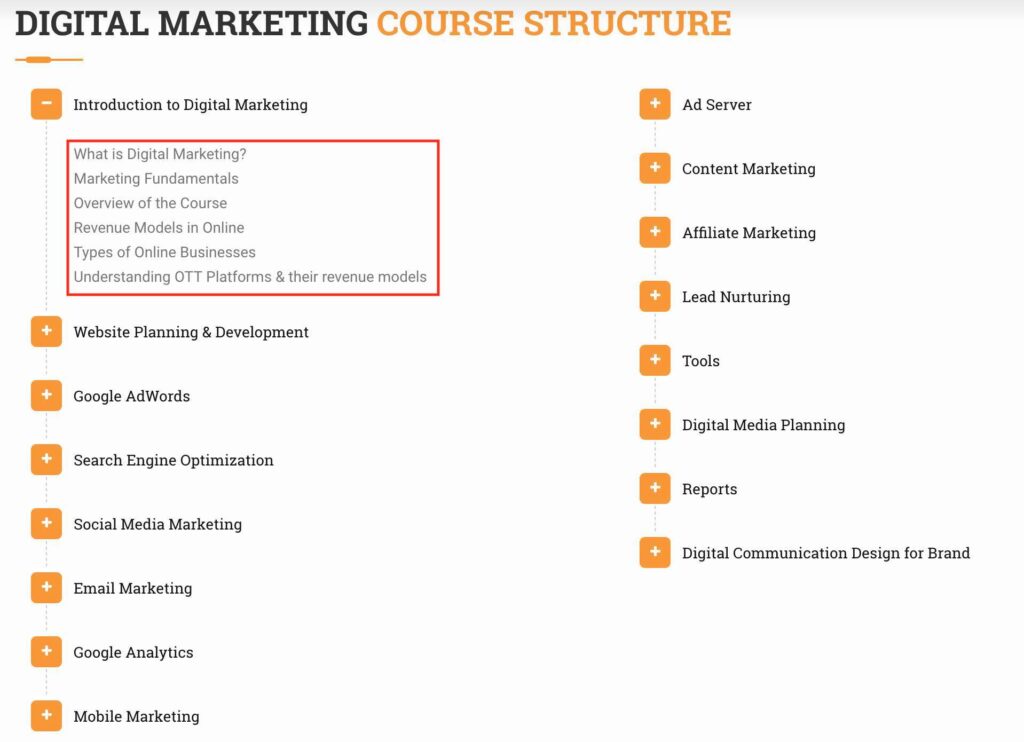
Search Engine Optimization (SEO) is one of the key domains in Digital Marketing to grow business. Most of the brands focus on SEO with a long term objective to drive value to their business. As search is intent, SEO has higher chances to generating conversions on your website. So What is Search Engine Optimization (SEO)? Search Engine Optimization is the process of increasing your website ranking in Google search results via unpaid methods. SEO is one of the effective ways to increase high quality traffic to your website. SEO traffic is also referred to as organic traffic or unpaid traffic. So Where Do SEO Results Appear in Search? SEO results appear between the paid search results of any Google search result page. As we know that there are 7 paid ads on a single page of Google, SEO results are in between those paid results. There are total 10 organic results in any given page of Google. Below screenshot will guide you, where the SEO results appear on Google search. Advantages of Search Engine Optimization! Builds High Search Visibility A business would have multiple products and services on their website. Also businesses create content in the form of blogs, whitepapers, videos etc which talks about their business and industry. So if you create good quality content and are ranking for multiple content pieces, your visibility on search increases. High Quality Traffic SEO results contributes to high quality traffic on your website. As SEO is intent, where users are actively looking for a product or a service or content pieces, the users search query is highly defined, Google ranks those pages which are highly relevant to the users and are optimized from search perspective. Higher Conversions As you would be driving high quality traffic, the chances of conversions will increase on your website. Marketers have observed that the conversion rates through organic traffic are high compared to other sources, so optimizing your website from search perspective is a must. Long Term Value Businesses always look to improve business month on month. Most of the businesses find it difficult to have advertising budgets throughout the year, that’s when SEO comes into the picture, as you have to optimise your website, you will be able to see results for long run, which will also help you to reduce your advertising budgets for your marketing campaigns. Before we move ahead in detail understanding of Search Engine Optimization, let’s understand first how do search engines work? As Google search engine is one of the most popular search engines in the world and takes the majority of the market share of search engines, let’s understand How Google search engine work! So How Do Search engines Work? Search engines have an algorithm defined which triggers the search results on search. This algorithm have programs called as robots/spiders/robots/crawlers which scans your website available on world wide wide, this process of scanning website is called crawling. Once the crawling is done by crawlers they save the content crawled in their database which is called as indexing. So when a search happens on Google search, the algorithm looks at the below factors to rank on Google search results page. Relevancy of the content with the search Authority – How trustworthy the content and website is On page factors of the website – How are the tags on the website defined with the keywords targeted Backlinks of the website – How well the website is connected with third party websites with are trustworthy websites Based on these signals, Google triggers the search results on search page. Here is a video to understand in detail, how Google Search Engine Works! (Source: Google) In SEO, would you come across these two terms quite often: Black Hat SEO White Hat SEO So let’s understand what each one is and which one to go with So What is Black Hat SEO Black hat SEO is a process of ranking your website in search engine with false methods including By adding invisible text By keyword stuffing Creating too many links from non-relevant websites Using cloaking methods – Cloaking is showing different content to search engines and showing different content to users on their browsers Adding duplicate content Never go with black hat SEO techniques because they will help you to rank quickly, but if identified by Google, you will be penalised by Google which includes ban from search engines for some time. So it’s a NO NO for black hat SEO So What is White Hat SEO White hat SEO is a process of ranking your website in search results with genuine efforts which includes Creating unique content Linking website with relevant trustworthy websites Following all the search engine factors in a genuine way Eg: On page factors, Off page factors etc. White hat SEO is basically using the best practices in a genuine way to rank your website on Google search. You should always follow white hat SEO techniques. Any method you might come across is called as Grey Hat SEO So What is Grey Hat SEO Grey hat SEO is a combination of Black Hat & White Hat SEO. It’s not 100% black hat and it’s not 100% white hat. Businesses do use grey hat SEO techniques to improve their organic rankings, but I would suggest go with only white hat SEO because they are no chances of your website getting penalised. In this article we would be looking at White hat SEO techniques only, so let’s get started and first understand the key components of SEO. Below are the key components of SEO Content Strategy Keyword Research On Page Optimization Off Page Optimization Let’s understand each one of them in detail: 1. Content Strategy Content Strategy is one of the key aspects of SEO. If the content strategy is not defined effectively, all your SEO efforts will add no value to your search rankings. Content strategy for a web page should be defined considering from a users perspective including the dept of

